Spotting UPS scam emails: What you need to know


When you expect a package, even if you’re not sure which carrier is delivering it, an official-looking email about a delay or problem can seem routine. In many cases, you might click this kind of alert without hesitating, assuming it contains important information about your shipment.
That’s exactly what makes UPS scam emails so effective. Attackers know that people anticipating deliveries are less likely to be suspicious, especially when the message appears to come from the United Parcel Service (UPS), a global shipping and logistics company. These phishing emails often mimic the wording, style, and branding of real UPS messages, making them highly convincing.
As these scams grow more sophisticated, it’s becoming harder to answer a simple question: is this UPS email real? In this guide, we’ll break down the most common UPS scams, show you how to spot them, and explain what to do if you fall victim.
What is a UPS scam?
A UPS scam is a phishing scheme where attackers send an email or SMS stating that there’s a delivery problem, a missed package, or an unpaid shipping fee that you need to take care of before you can get your package. The message usually includes a link that looks like a legitimate UPS tracking or payment page. The goal is to push you into clicking the link quickly, before you question whether the message is real.
Once you click on the link, scammers may be able to steal payment details, collect other personal information, or attempt to install malware on your device.
How to spot a UPS scam email
The widespread use of AI tools has unfortunately made scam emails more polished than they used to be, meaning it can be more difficult to spot a scam at first glance. However, if you pay close attention to the details, you’ll often be able to find red flags that indicate something isn’t right about the email.
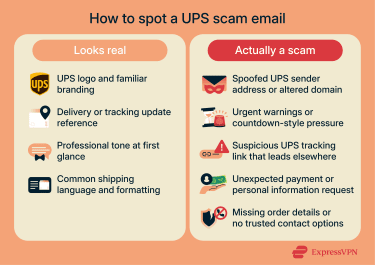
Common signs of a UPS shipping scam email
- Design inconsistencies: Scam emails often include distorted logos, low-quality images, or layouts that feel slightly “off” compared to real UPS messages.
- Poor grammar or unusual punctuation: While AI has reduced this issue, scam emails can still have spelling or grammar mistakes and awkward phrasing.
- Suspicious sender addresses: Attackers often rely on a spoofed UPS sender address that looks official but doesn't match legitimate domains. Real UPS emails typically come from ups.com or upsemail.com.
- Urgent or threatening language: Messages that push immediate action, such as warnings about account suspension, delivery cancellation, or time-limited responses, often indicate a UPS delivery failure scam.
- Unexpected payment or data requests: Requests for shipping fees, customs payments, or personal details such as banking information are common signs of a UPS package delivery scam. UPS doesn't ask for sensitive information through unsolicited email links.
- Deceptive tracking links: A UPS tracking link may look legitimate, but redirect elsewhere. Hovering over the link often reveals a mismatched or unfamiliar destination, which strongly suggests a UPS tracking scam.
How to check if a UPS email is legitimate
UPS does send legitimate emails with links, which can make it tough to know whether the email you received is real or fake. The first thing to do is to look at the sender email address. UPS published a list of official email addresses, but make sure to pay close attention, as scammers can leave off a letter or switch a couple of letters, making it appear real at first glance. Here are some legitimate addresses that UPS uses:
- accountconfirm@ups.com
- mcinfo@ups.com
- pkginfo@ups.com
- customer-notifications@ups.com
- auto-notify@ups.com
- emailinfo@ups.com
- invoice-notification@ups.com
- UPSAdministrationSupport@ups.com
- donotreply@ups.com
If the email has a link, hover your mouse over it before you click, and inspect the actual link destination. A legitimate UPS link will normally start with https://ups.com or https://billing.ups.com.
Some UPS emails might have an “epackage” link, which provides a secure way of sending and receiving sensitive information. These links always start with https://ftp2.ups.com. Links that lead to any other URL are a strong indicator that it’s not a real UPS email.
UPS text messages in the US are sent from 75137. A text message from any other number claiming to be from UPS should be viewed as potentially malicious, ignored, and blocked.
Types of UPS scams
UPS scams use a general template that imitates how UPS operates, but violates UPS’s real communication practices. They often follow a similar pattern, but it’s important to understand that there are many ways that a scammer can try to get the information they need to scam you. That said, here are some of the most common UPS scam types, including email, text, and phone-based UPS parcel scams.
UPS tracking number scams
A UPS tracking number scam sends an email or SMS with a fake or old tracking ID. The message says your package is in transit and encourages you to “track” it using a provided link. That link leads to a counterfeit tracking page designed to steal login credentials or personal data or to redirect you toward a follow-up payment request. The tracking number may look legitimate, but it typically refers to an unrelated shipment (or to no shipment at all), and isn’t related to your own address or UPS account.
UPS delivery failure scams
A UPS delivery failure scam claims that your package can’t be delivered due to an address error or no one being home, and the email will provide a link to finalize the delivery. The link, which may appear to be to a UPS website, will redirect to a spoofed page where the scammers may prompt you to enter personal details or pay a service fee.
Fake shipping fee or customs payment scams
This variation focuses on small, unexpected charges, such as a customs fee, additional tax, or a missing delivery payment that’s holding up the delivery. The amount is usually low, which makes it feel believable and not worth questioning. The payment page, however, sends your card details directly to the scammer and provides no legitimate delivery service in return. Note that UPS can collect legitimate customs fees, but it never does so via unsolicited SMS or email links.
UPS smishing text message scams
A UPS smishing (SMS phishing) scam doesn’t have the same branding imagery as email. The content of the message is often shorter and more urgent, claiming a delivery problem or asking you to confirm a shipment. Because texts feel more personal and immediate, and links are usually shortened, people are more likely to tap a suspicious UPS tracking link without checking the sender.
UPS vishing phone call scams
Some attackers escalate phishing attempts into phone calls, a tactic known as vishing (voice phishing). The caller pretends to represent UPS customer support and references a delivery issue or outstanding fee. These calls often follow a phishing email or text to make the situation feel more legitimate. The goal is to pressure you into sharing personal details, payment information, or one-time verification codes. These codes are then typically used to take over your email or online accounts.
Rewards scams
Some UPS shipping scam emails claim you’ve been selected for an exclusive prize or reward. These messages can ask you to click a link to collect your prize. While they use UPS branding, logos, and delivery imagery, the promotion itself isn’t real. When you click the link, the scam typically escalates; you might be asked for personal information, a small “processing” fee payment, or payment details to claim the reward. Needless to say, if you provide these, they go direct to the scammers.
What to do if you fall victim to a UPS scam
If you clicked a link in a suspicious UPS message but closed the page before entering any information or downloading anything, the risk of damage stays low. Even so, you should run a full system scan using a trusted antivirus program to check for any potential threats.
While no scan can guarantee that a system is completely clean, it can help to lower the risk of undetected malware remaining on your device, especially if the link attempted a silent download.
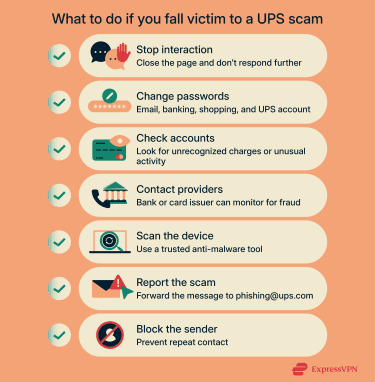
If you clicked a link and entered information, responded to the message, or completed a form before realizing you were being taken in by a UPS scam, you need to act quickly. Early action can limit financial loss, prevent account takeovers, and reduce the risk of identity theft.
Immediate steps to take
Many of these steps apply across all common UPS phishing scam examples, regardless of whether the message arrives by email, text, or phone.
- Change your passwords: Update passwords for any accounts you entered on the fake site, especially email, banking, or other financial accounts. Whenever possible, activate phishing-resistant multi-factor authentication (MFA) to enhance security in the event of compromised credentials. It’s also a good idea to use a secure password manager to create and store strong, unique passwords for all your accounts.
- Monitor your financial accounts closely: Review your recent transactions for any unrecognized charges, even small ones. Scammers may test stolen payment details with low-value purchases before escalating to larger ones. If you see transactions you don’t recognize, contact your bank immediately and ask about placing temporary restrictions or alerts on your accounts.
- Contact your bank or card provider: Even if you haven’t spotted any suspicious transactions, it’s a good idea to notify your financial provider about the incident and ask about blocking charges, issuing new cards, or placing additional monitoring on your accounts.
- Report the scam to UPS: You can forward fraudulent emails or texts to fraud@ups.com. This helps UPS track and shut down active scams.
- Report the incident to consumer protection authorities: In the U.S., you can file a report with the Federal Trade Commission (FTC) at reportfraud.ftc.gov. Other countries have similar agencies for reporting consumer fraud.
Protecting your identity after a scam
A UPS package delivery scam can escalate into identity theft if attackers are able to collect enough of your personal data. Taking additional protective steps helps reduce the long-term risk of this.
- Protect your identity: If scammers obtained sensitive personal information, they can use this to open accounts, file fraudulent claims, or impersonate you in other harmful ways. Identity protection services can help detect early warning signs of identity theft. For example, ExpressVPN’s ID Alerts can monitor the dark web, public records, and your linked financial accounts for signs of exposure or misuse of your personal information, helping you act quickly to lock down any compromised accounts.
- Monitor your credit: Request a credit report and review it for any unfamiliar activity. If you spot something suspicious, dispute it promptly. In higher-risk cases, a temporary credit freeze can prevent new accounts from being opened in your name. You can also use ExpressVPN’s Credit Scanner to monitor your credit score and get alerts about suspicious activity in real time.
- Stay alert over time: Cybercriminals don't always act immediately. Continue watching for unusual account activity, unexpected emails, or follow-up scams that reference the original UPS incident.
Note: ID Alerts and Credit Scanner are available as part of the Identity Defender app to U.S. users on eligible subscriptions.
How to protect yourself from UPS phishing emails
UPS phishing scam emails rely on urgency and familiarity, but a few consistent habits can significantly reduce your risk. First up, treat any unsolicited message that asks you to validate tracking details, reference numbers, or account information with caution, especially if it arrives unexpectedly.
Remember: never share tracking numbers, reference codes, or account details with unknown senders, and avoid engaging with messages that pressure you to confirm shipment information outside official channels.
Essential safety tips
Legitimate UPS communications don't request sensitive information in unsolicited messages. And when it comes to payments, all legitimate UPS payments occur via official UPS billing portals or established accounts, not via surprise links.
To reduce your exposure to UPS phishing scams, don't respond to emails or messages that ask you to provide, update, or verify personal or financial information. Here are some general rules to follow:
- Avoid clicking links or opening attachments from unknown or untrusted sources.
- Never share your UPS login credentials with anyone.
- Use strong, unique passwords and update them regularly.
- Keep your operating system, browser, and security software up to date.
- Use antivirus and anti-malware tools and enable a firewall where possible.
- Avoid signing in to your UPS account on public computers whenever possible. If you must use public or unsecured Wi-Fi, consider using a reputable virtual private network (VPN) like ExpressVPN that includes malicious site blocking and encrypts all of your internet traffic. While UPS encrypts legitimate login pages, VPNs with built-in threat filtering can help block known fake sites and reduce exposure to network-based attacks on untrusted connections.
What to do when you receive a suspicious UPS email
Just receiving a suspicious UPS email doesn’t mean that the attackers have your information. As long as you follow these steps, you’ll be able to delete the message with no harm done.
- Pause and review the message: Look for any potential red flags that could indicate a UPS scam.
- Verify safely using official UPS pages: If the message mentions a payment, delivery fee, or account issue, confirm it directly through official UPS tools rather than responding to the email:
- Payment is needed or overdue: Never send cash, gift cards, wire transfers, or money orders. Check legitimate charges through the UPS Billing Center.
- Funds required for package delivery: Only certain shipments require payment, such as collect-on-delivery packages or packages that are subject to duties and taxes. Tracking your package on the official UPS tracking page is the safest way to confirm whether fees apply.
- Account or payment information requested: Unexpected alerts about account issues often indicate a fraudulent UPS notification. Log into your UPS account to review recent shipping and billing activity.
- Check the link without clicking it: UPS uses specific links in its emails, so you can inspect the link by hovering over it to ensure it’s legitimate before clicking it.
- Don't click links within the message: Even if the link looks real, it’s best not to click it. Instead, go to the UPS website directly by manually typing the URL into your browser. If the message refers to a delivery, check the status there using information you already have about your delivery.
- Verify through trusted sources: If you recently placed an order, log into the retailer’s website where you made the purchase and review the shipping details from your account. Don't rely on the contact information provided in the email.
- Delete and block the sender: If you’ve determined that the message isn’t legitimate, removing it helps prevent accidental clicks later and blocking the sender reduces the likelihood of repeat contact from the same source. Remember to report it to UPS, too.
- Be skeptical of unexpected rewards or discounts: Messages offering prizes, refunds, or deeply discounted shipping labels often signal a scam. If something feels unusually generous, treat it as suspicious.
FAQ: Common questions about UPS scams
Does UPS send email notifications?
Yes, UPS sends emails about deliveries, tracking updates, and account activity. However, there are red flags that indicate a UPS message is fake; for example, it might contain a payment request, ask for your passwords, or contain a link that doesn’t lead to the real UPS site.
What does a legitimate UPS email look like?
A legitimate UPS email will come from a confirmed UPS sender email and will only contain links back to official UPS domains. It won’t ask for money, your password, or any other personal details, and it will generally offer a secondary way for you to get in touch with UPS to resolve the issue they’re emailing about.
Are UPS scam texts dangerous?
Simply receiving a scam text doesn't cause harm, but engaging with it can. The risk starts when you interact with the message. If you tap a link, enter personal information, respond to the sender, or download anything, scammers may collect your data or attempt to install malware. The good news is that you can take some steps to limit your exposure to further harm.
How can I report a UPS phishing email?
You can report a UPS phishing email by forwarding it to fraud@ups.com. When you forward the message, don't change the subject line or message contents, and don't include any personal or confidential information. You may also report the scam to your local consumer protection or fraud reporting authority.
What should I do if I clicked on a fake UPS link?
If you clicked a link but didn’t enter any information or download anything, scan your system with antivirus software as a precaution. If you entered personal, login, or payment details, act quickly. Change exposed passwords, contact your bank or card provider, monitor your accounts for suspicious activity, and report the scam to UPS and relevant authorities.
Can scammers steal my data through a UPS tracking scam?
A UPS tracking scam may lead to a fake website that asks for personal information or silently installs malware on your device. In some cases, scammers also use follow-up phone calls to pose as customer support and request account or payment details. These tactics aim to collect data that can later support fraud or identity theft.
Take the first step to protect yourself online. Try ExpressVPN risk-free.
Get ExpressVPN














 Support Center
  FAQ
FAQ  VPN Setup Tutorials