 Celebrate with up to 80% off
Is WhatsApp safe enough for sending private photos?


WhatsApp is one of the world's most widely used messaging apps. Sending everyday content is usually straightforward, but sharing private photos over WhatsApp carries different privacy risks. If you’re sending (or receiving) private photos on the app, it’s worth understanding how it treats images in transit and whether and where they’re stored.
Is WhatsApp safe for private photos?
WhatsApp includes privacy and security features for sending private photos, but it can’t guarantee that all shared media will remain private.
According to WhatsApp's encryption documentation, its core privacy feature is end-to-end encryption (E2EE), which is designed so that only the people in a chat can access its contents.
However, encrypted delivery is only one part of photo privacy. How safe a private photo remains also depends on the type of image, the recipient, and the account, device, backup, and chat settings in place.
Read more: Is WhatsApp safe to use? A complete guide for every user.
Lower-risk photos to share on WhatsApp
Generally, lower-risk media is less likely to cause lasting privacy, financial, or personal consequences, especially when shared with trusted WhatsApp contacts. Examples may include:
- Casual selfies and everyday photos or videos.
- Vacation and travel content that doesn’t reveal sensitive location details in real time.
- Memes, jokes, and social media content.
- Expired event tickets or QR codes that no longer grant access.
- Product photos or shopping screenshots that don’t show personal, payment, delivery, or account details.
- Non-sensitive work collaboration images.
Photos that carry higher privacy risks
Some photos are more sensitive because they can reveal identity, financial information, health information, location, confidential work, or vulnerable people. Examples include:
- Explicit or intimate photos.
- Copies of passports, IDs, or financial documents.
- Images showing home addresses or contact details.
- Confidential business or legal documents.
- Medical records or health-related images.
- Photos that could identify children, minors, or other vulnerable people in ways they haven’t consented to.
- Anything that could be used for blackmail, extortion, impersonation, or fraud.
How WhatsApp protects private photos
WhatsApp offers several built-in features that can help protect shared photos and videos. Some are on by default, while others require manual activation.
End-to-end encryption (E2EE)
WhatsApp's encryption documentation states that E2EE is enabled by default for personal messages, including photos. Message contents are secured before they leave the sender’s device and can only be decrypted by the intended recipients’ devices. WhatsApp also says no one outside the chat, not even WhatsApp, can read or view them.
WhatsApp’s technical overview says its E2EE is based on the Signal Protocol, which uses multiple cryptographic keys for session setup and message protection. For media attachments such as images, the WhatsApp app encrypts the file on the sender’s device with an Advanced Encryption Standard (AES) 256-bit key and uses Hash-based Message Authentication Code based on the Secure Hash Algorithm 256-bit (HMAC-SHA256) for authentication. This is designed to prevent intercepted image files from being readable in transit without the relevant keys.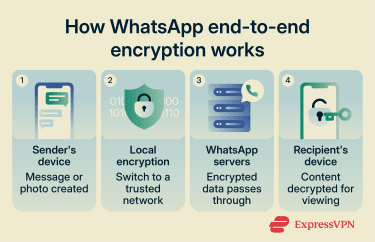
Disappearing messages
When activated for a chat, disappearing messages, which includes photos, are removed after a set period. According to WhatsApp, they can be enabled for individual chats or group chats, or set as the default for new chats. Turning them on in an existing chat affects only new messages, not the earlier chat history.
Messages can be set to disappear after 24 hours, 7 days, or 90 days. Photos sent in disappearing-message chats are removed from the chat after the selected period has passed, unless they're preserved elsewhere. However, disappearing messages don’t guarantee that photos are deleted from every device or backup.
A few caveats apply:
- Notification previews may remain visible until WhatsApp is opened.
- Copies forwarded to chats where disappearing messages are off won’t disappear there.
- Quoted replies may keep the quoted text visible after the original message disappears.
- Media may still be saved to a recipient’s device if auto-download is enabled.
- A recipient can copy, screenshot, photograph, or otherwise save content before it disappears.
- A recipient can attempt to keep a disappearing message, but the sender can unkeep it.
In individual chats, either person can turn disappearing messages on or off. In group chats, admins can control whether all members or only admins can change the setting. WhatsApp displays a system message in the chat when the settings change.
View once photos and videos
WhatsApp allows users to send a photo or video that disappears from the chat after the recipient opens it once. The setting applies to each file before it's sent and can’t be changed after sending.
View-once media can’t be saved, forwarded, shared, kept, copied, screenshotted, or screen-recorded inside WhatsApp, and it doesn’t appear in the recipient’s Photos or Gallery. Because screenshot and screen recording protection isn’t available on desktop, View once media can only be opened in WhatsApp’s mobile apps.
However, View once doesn’t prevent every possible capture method. WhatsApp warns that recipients may still be able to take a photo or video of the media with another camera or device before it disappears.
Unopened View once images can be restored from backup, but opened View once media is excluded from backups and can’t be restored.
Two-step verification
WhatsApp requires a phone number that can receive a registration code to register an account. This helps verify control of the number, but it doesn’t confirm the identity of the person using it.
Using a WhatsApp account on a new device requires verification. If two-step verification is enabled, WhatsApp may also ask for the account’s six-digit PIN. This helps reduce the risk of someone using a phone number alone to register the account on another device, where they may try to access chats, shared photos, or restored backups.
Also read: What can someone do with your phone number? Understand the risks.
App lock and device security
WhatsApp offers an app lock feature on supported platforms (not yet available on Mac at the time of writing), including mobile apps and WhatsApp Web. When enabled, these features require a device-based security check before WhatsApp can be opened or resumed, with timing options that vary by platform.
Verification methods may include fingerprint, facial recognition, password, or PIN, depending on the device and app. This can reduce the risk of someone with physical access to a device opening chats and viewing sensitive or temporary media, like private photos.
Chat lock offers similar protection for specific chats by moving them to a locked chats folder. According to WhatsApp, locked chats can also be hidden and protected with a secret code created on Android or iPhone.
Advanced chat privacy
This optional setting applies additional privacy constraints to individual and group chats. According to WhatsApp, when advanced chat privacy is enabled, people in the chat can’t automatically save media to their device gallery or export the chat.
The setting also limits certain in-chat AI features, such as mentioning Meta AI in the chat or asking it to summarize unread messages. This can reduce the ways chat content, including photos, is shared with Meta AI features, but it doesn’t prevent every possible way media could be copied, captured, or shared outside the chat.
WhatsApp privacy limits to keep in mind
WhatsApp has privacy limits common to communication and social media apps, many of which stem from interacting with other people online rather than weaknesses in the platform itself. Understanding these limits can help identify higher-risk situations before private photos are shared.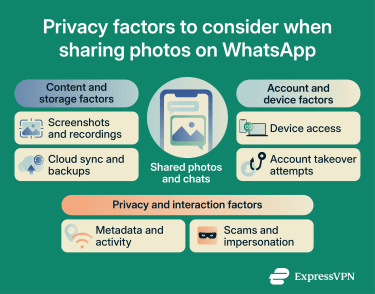
Screenshots and screen recording
Recipients can use screenshot or recording tools to capture conversation contents, including sent images. WhatsApp doesn’t prevent this for normal chat history or when disappearing messages are enabled. Photos and videos sent normally can also be saved, forwarded, copied, or edited using WhatsApp's built-in tools.
Even when using View once media, recipients may still capture photos with another camera or device before the media disappears. View once reduces opportunities to save temporary images, but it isn’t completely foolproof.
Cloud backup and saved media
Received media may be saved to a device’s photos or gallery depending on WhatsApp and device settings, including whether auto-download is enabled for disappearing-message chats.
Messages and media stored in cloud backups are protected with E2EE only if end-to-end encrypted backup is enabled. If a disappearing message is backed up before it disappears, it will be included in the backup but deleted when the backup is restored.
Linked devices and account access
Despite WhatsApp’s account security features, account compromise remains a risk. Someone who gains access to an authorized device, linked device, or restored backup may be able to view, save, or forward shared photos without the account holder’s knowledge.
The most common methods include malware, phishing, SIM swap attacks, stolen verification codes, or access to a recovery email. These can help scammers or attackers steal credentials, register an account, or impersonate a trusted contact.
Metadata WhatsApp may collect
WhatsApp’s Privacy Policy states that personal messages and calls are end-to-end encrypted and that WhatsApp can’t read or listen to them. However, WhatsApp may collect other account, device, connection, usage, log, and troubleshooting information, such as phone numbers, IP addresses, device details, timestamps, and usage data for services or features.
WhatsApp says it uses this information to operate, provide, improve, understand, customize, support, and market its services, and to promote safety, security, and integrity. It also says certain information may be shared with other Meta companies, service providers, and third parties as described in its Privacy Policy.
Scams, phishing, and fake contacts
Scammers often target WhatsApp users with social engineering attacks, including impersonating someone the target knows or a legitimate business. A common example is an unfamiliar contact claiming to be an old friend reaching out from a new number, or a business contact asking to verify transaction details.
The goal is typically to obtain sensitive files such as government IDs, banking details, or intimate photos, which can then be used for blackmail, identity fraud, financial theft, or to impersonate the target and attack other contacts.
How to send photos more safely
Privacy settings and sharing choices both affect how private photos are handled after they’re sent. Before sending sensitive photos:
- Verify the recipient: Temporary media still becomes visible to the recipient, even if only once.
- Share the minimum needed: Avoid including extra details such as addresses, account numbers, documents, or location clues.
- Use View once for one-time media: This can reduce the ability to save and forward messages in WhatsApp, though it doesn’t prevent all forms of capture.
- Use disappearing messages for sensitive chats: These can reduce how long photos and messages remain visible in the chat, but they don’t erase copies saved elsewhere.
- Review privacy and account settings: Check linked devices, two-step verification, passkeys, app lock, profile visibility, blocked contacts, and chats you no longer use.
- Review backup settings: Cloud backups are protected with E2EE only if end-to-end encrypted backup is enabled.
- Keep apps and devices updated: Updates can include security fixes for WhatsApp, the operating system, and the browser or desktop app used to access WhatsApp.
What to do after sending a photo
If a photo is sent to the wrong person or shared without temporary media protections, there are still steps you can take that may reduce further exposure:
- Delete the message quickly: Tap and hold the image, tap the trash icon, then select Delete for everyone. WhatsApp allows this for a limited time, but deleting a message doesn’t guarantee the recipient hasn’t already seen, saved, forwarded, or captured it.
- Ask the recipient to delete the photo: If the recipient is trustworthy, ask them not to save or share photos exchanged privately. The message may also help document that the photo wasn’t intended to be kept or reshared.
- Remove local copies: Delete the photo from the device gallery, the recently deleted folder, and any synced cloud storage or backups where it may have been saved.
- Check linked devices: Review linked devices and remove any sessions that are outdated, unknown, or no longer needed.
- Block or report suspicious accounts: If the photo was shared in a scam, an impersonation attempt, or an unwanted exchange, use WhatsApp’s block and report options.
- Monitor for impersonation or extortion attempts: Watch for scams, extortion, or account compromise. If the photo exposes credentials or personally identifiable information (PII), update the affected login details and security settings.
Also read: How to recover a hacked WhatsApp account.
FAQ
Can WhatsApp employees see my photos?
Can someone screenshot View once photos?
Are WhatsApp photos stored on servers?
Are WhatsApp backups encrypted?
Is Signal safer than WhatsApp?
What should I avoid sending on WhatsApp?