What is an NFC tag, and how does it work? A complete guide


If you’ve ever used contactless payments, entered a building by tapping your phone, or checked out a product with a quick tap, you’ve interacted with near-field communication (NFC) tags. NFC powers many everyday actions that feel instant and effortless, but if you’re unsure about what it is or how it works, it’s natural to question its safety and security.
In this guide, we’ll break down what NFC tags are, how they work, where they’re used, and what to know about using them safely.
What is an NFC tag?
NFC stands for near-field communication, a short-range wireless technology that powers NFC tags and enables quick interactions between a tag and a nearby device. NFC tags work without batteries and trigger specific actions when a phone, card, or wearable is held within a few centimeters.
How NFC technology works
There are two components to any NFC interaction:
- NFC tag.
- NFC reader, such as a smartphone or payment terminal.
These devices exchange information using a standardized system (the NFC Data Exchange Format).
The science behind near-field communication
NFC is built on radio-frequency identification (RFID) principles, but it’s designed specifically for very short-range, intentional interactions. It relies on electromagnetic induction rather than traditional radio transmission; this allows devices to exchange data only when they’re extremely close together.
In an NFC interaction, the reader generates a high-frequency electromagnetic field. When an NFC tag enters this field, its antenna captures enough energy to power the tag’s chip. The tag then responds by modulating the reader’s field to transmit its stored data back to the device.
NFC operates at a standardized frequency of 13.56MHz and is defined by standards such as those from the International Organization for Standardization / International Electrotechnical Commission (ISO/IEC), including ISO/IEC 14443 and ISO/IEC 18092, which limits communication to just a few centimeters. This physical constraint helps ensure that NFC interactions are deliberate, controlled, and difficult to trigger accidentally.
NFC vs. RFID: Key differences
| NFC | RFID | |
| Typical range | Very short range (a few centimeters) | Short to long range, depending on the system |
| Interaction style | User-initiated and intentional | Often automatic and passive |
| Communication direction | Two-way communication | Primarily reader-to-tag with limited tag response |
| Data exchange | Supports back-and-forth data exchange | Tag typically sends data only |
| Common use cases | Contactless payments, access control, mobile interactions | Inventory tracking, asset management, logistics |
| Consumer device support | Built into smartphones and wearables | Usually requires dedicated readers |
What an NFC tag is made of
An NFC tag has 3 core components:
- A microchip, often referred to as an NFC chip, that stores data.
- A small antenna that communicates with the reader.
- A substrate, such as plastic or paper, that holds everything together.
Active vs. passive NFC tags
NFC communication can operate in two modes: passive mode and active mode.
In passive mode, an active NFC reader generates a high-frequency electromagnetic field to power a passive tag. The passive tag doesn't generate its own signal. Instead, it transmits data by modulating the reader’s field. This mode is used in most everyday scenarios, including contactless payments and access cards.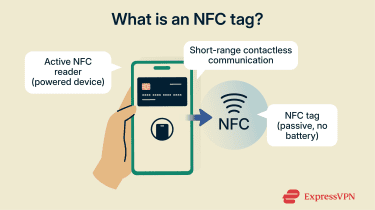
In active mode, both devices involved in the exchange have their own power source. Each device generates its own electromagnetic field during transmission and disables it while waiting for a response. This mode allows for two-way communication between devices, but it’s less common in consumer NFC applications.
How smartphones read NFC tags
When you bring a smartphone close to an NFC tag, the phone’s NFC reader powers the tag and reads the data stored on it. This data might include a website link, contact information, or a command that triggers a predefined action.
The phone’s OS then processes the information and carries out the appropriate response, such as opening a webpage, launching an app, or pairing devices.
Types of NFC tags
NFC tags are grouped into five main types that differ in memory size, communication method, and typical use cases.
Type 1 tags: Lightweight and configurable
Type 1 tags are designed for basic interactions where low cost and flexibility matter more than performance or security. They support rewriting and can be permanently locked after programming, but they store relatively small amounts of data and are slower than other types.
Type 2 tags: The everyday standard
Type 2 tags are the most widely used NFC tags for smartphones and consumer applications. They offer better compatibility across Android and iOS devices than Type 1 tags and strike a balance between simplicity, reliability, and cost.
They support rewritable and locked configurations, modest memory sizes, and stable performance across various devices. That combination makes Type 2 tags ideal for everyday consumer use cases such as marketing stickers, smart posters, and product authentication.
Type 3 tags: Built for speed and scale
Type 3 tags use the FeliCa, a contactless smart card system developed by Sony, and are optimized for fast, low-latency communication. Their architecture supports rapid exchanges and larger data structures, which makes them suitable for systems that process many transactions quickly.
Because Type 3 tags typically operate within closed, tightly controlled ecosystems, they’re most often used in transportation networks and proprietary payment or ticketing systems. They’re rarely used for open consumer applications or casual NFC projects.
Type 4 tags: Security-focused applications
Type 4 tags are designed for scenarios where authentication and data protection are critical. They support advanced security features and larger memory sizes, which makes them suitable for payment cards, identity credentials, and secure access systems. These tags are usually not intended for casual rewriting or consumer customization.
Type 5 tags: Longer range, specialized use
Type 5 tags operate under a different standard that allows for greater reading distances than traditional NFC. That extended range makes them useful for inventory tracking and industrial workflows, but less practical for phone-based interactions that depend on precise, intentional taps.
Differences in speed, memory, and security levels
| NFC tag category | Typical memory | Communication speed | Security features | Use cases |
| Type 1 | 96 bytes–2KB | Slower | Minimal | Promotional and informational tags |
| Type 2 | 48 bytes–2KB | Moderate | Basic | Consumer devices, retail promotions |
| Type 3 | Up to 1MB | Fast | Strong | Ticketing and closed payment systems |
| Type 4 | 32KB–1MB | Fast | Very strong | Payments, access control, IDs |
| Type 5 | Up to several KB, depends on tag | Moderate | Moderate | Industrial and logistics use |
Which NFC tag type is best for consumers?
For most consumer-facing use cases, NFC Type 2 tags are the best fit. They offer a good balance of compatibility, reliability, and simplicity, and they work with nearly all NFC-enabled smartphones. This makes them ideal for everyday actions like opening links, triggering automations, or enabling basic access controls.
Common uses of NFC tags
NFC tags are used across a wide range of consumer-facing scenarios, but not all of these rely on the same tag types. Low-security interactions, such as opening links, sharing information, or triggering simple automations, often use NFC tags such as Type 2. However, payments, access control, and identity systems typically rely on more secure NFC implementations designed specifically for those use cases.
Contactless payments and digital wallets
Smartphones, smartwatches, credit cards, and debit cards use NFC to communicate with payment terminals during tap-to-pay transactions. Digital wallets store payment credentials securely on the device, while NFC handles the short-range exchange needed to authorize a purchase.
Access control and identification
NFC tags streamline access control in offices, residential buildings, and secure facilities. Badges, cards, or phone-based credentials can grant entry when held near a reader, replacing physical keys or manual check-ins.
These systems often rely on NFC’s ability to exchange data quickly while limiting interaction to intentional, close-range scans. In some environments, the same tag can also log entry times or verify identity.
Public transport, ticketing, and smart check-ins
Many public transport systems use NFC to simplify the process of purchasing tickets. Transit cards and mobile passes allow riders to tap in and out without needing paper tickets or barcode scans.
NFC tags are also used for event entry, hotel check-ins, and workplace attendance systems. In these cases, NFC helps reduce friction by making verification almost instantaneous.
Smart retail and product authentication
In retail settings, NFC tags can provide product information, verify authenticity, or support interactive experiences. Tapping a product tag might display usage instructions, warranty details, or promotional content on a phone.
Some brands also use NFC to help confirm that a product is genuine, which can be useful for high-value or frequently counterfeited items.
Home automation and routine triggers (Android and iPhone)
NFC tags are a simple way to trigger smart home actions without opening an app or navigating menus. A single tap can adjust lights, set a thermostat, arm a security system, or start a routine that combines several actions at once. Because the interaction is intentional and location-based, NFC works especially well for tasks you repeat every day.
Both Android and iPhone support NFC-based automations, though they approach them differently. On iOS, the Shortcuts app allows users to create NFC-triggered workflows that control smart home devices, adjust settings, or run multi-step routines. On Android, automation apps such as Tasker and IFTTT enable similar functionality, offering more flexibility at the cost of a slightly more complex setup.
Business operations and inventory tracking
Using NFC tags is an easy way to streamline some business operations. A quick scan can record inventory movement, confirm employee check-ins, or update equipment status without manual data entry.
For asset management, NFC tags offer a reliable way to identify and track physical items. They support accurate record keeping and make it easier to monitor inventory levels, helping organizations improve efficiency while reducing loss or misplacement.
In industrial settings, specialized NFC tags are built to work on metal surfaces or rugged equipment. These tags allow manufacturers and logistics teams to maintain consistent asset tracking even in environments where traditional labeling methods fall short.
Benefits of using NFC tags
NFC tags are designed for contactless communication that removes friction from everyday interactions. Their value comes from how quickly they work, how little infrastructure they require, and how easily they adapt to different use cases.
Fast and contactless interactions
NFC interactions are nearly instantaneous. A simple tap between a phone, card, or wearable and an NFC-enabled reader completes an action without menus, typing, or scanning codes. This speed makes NFC especially useful for payments, access checks, and identity validation.
Contactless payments are a common example. Whether using a physical card or a mobile wallet like Apple Pay or Google Pay, users can complete transactions quickly without handling cash or entering details manually. The result is smoother interactions, fewer errors, and a more convenient experience for users and businesses.
No network required
NFC tags don’t need an active internet connection to function, which makes them reliable in environments with limited or no connectivity.
This offline capability allows NFC to work consistently for tasks such as payments, access control, and data transfer, even when a device is temporarily disconnected. Any follow-up actions that require internet access can occur later, once a connection is available.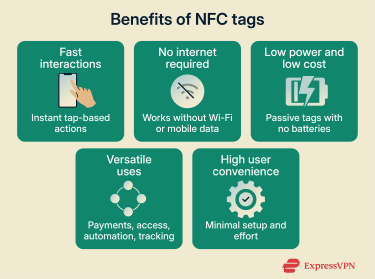
Low-power, low-cost technology
NFC technology is designed to be energy efficient. Most NFC tags are passive, meaning they draw power from the reader only when scanned and don’t need batteries. This makes them well-suited for long-term use with minimal maintenance.
From a cost perspective, NFC systems are relatively easy to integrate into existing setups. Many organizations can add NFC-based access or identification without replacing their entire infrastructure. Because NFC tags are often reusable and reprogrammable, they also reduce ongoing costs associated with lost keys, access changes, and hardware replacement.
Versatile across many applications
One of NFC’s biggest strengths is flexibility. NFC tags can be programmed to perform a wide range of actions, from launching apps and setting reminders to controlling smart home devices or triggering in-car functions.
For individuals, these functions can mean automating daily routines with a tap. For businesses, they can streamline workflows or enable interactive customer experiences. The range of possible uses depends largely on how the tags are programmed and which apps or systems they connect to.
High user convenience
NFC works with minimal effort from the user. Actions are triggered intentionally, quickly, and without complex setup once the system is in place. This simplicity makes NFC accessible to people who aren’t particularly tech-savvy.
Because NFC is already built into most modern smartphones and many everyday devices, users can take advantage of it without additional hardware. That ease of adoption is a key reason NFC tag use continues to increase.
NFC security and privacy risks
NFC is designed to be short-range and intentional, which already reduces many risks. Still, like any technology that handles payments, identity, or automation, there are some vulnerabilities that, if exposed, can cause significant damage. Most NFC-related threats depend on proximity and user behavior.
Skimming and eavesdropping
Eavesdropping occurs when an attacker attempts to intercept an NFC exchange. Because NFC operates over very short distances, practical interception is extremely difficult, and most real-world attacks rely on compromised devices and malware rather than hardware setups.
Skimming, sometimes called “digital pickpocketing,” is a more common concern with contactless cards. In this scenario, a malicious reader placed close to a card (or embedded near a legitimate payment terminal) can attempt to capture card data without the owner realizing it. Physical protection, such as shielding your card in an RFID-blocking wallet, is often the most effective defense against this type of attack.
While these attacks are possible, they rely on close physical proximity and often fail against properly secured payment systems.
How malware can spread via manipulated NFC triggers
NFC tags can be programmed to trigger actions automatically, such as opening a link or launching an app. In some cases, attackers exploit this behavior by placing or altering tags so they point to malicious content.
If a user scans such a tag and approves the action, it may lead to a harmful software download or redirect them to a site designed to steal sensitive information. This risk is higher on platforms or setups that allow automated actions without clear user confirmation.
Modern OSs place restrictions on what NFC triggers can do, but users should still avoid scanning unknown or untrusted tags, especially in public places.
How to stay safe when using NFC tags
Keeping your NFC-enabled devices physically secure goes a long way toward protecting your interactions. Because NFC typically only works within a few centimeters, most everyday use is safe when your phone, card, or wearable stays with you and is locked.
That said, some attacks can happen even when you do everything right, which is why knowing what to watch for matters. Here are some tips for staying safe while enjoying the benefits of NFC tags.
Disable NFC when not in use
If you don’t use NFC regularly, turning it off when it’s not needed reduces the chance of accidental scans or unwanted triggers. You can also limit what actions NFC is allowed to perform.
This is only possible on Android, as you can’t turn off NFC on modern iPhones. It’s built into the hardware and OS and stays enabled to support core features such as Apple Pay, AirPods pairing, and other system-level functions.
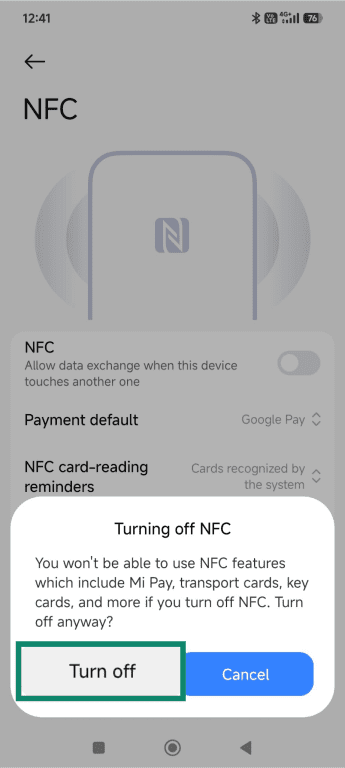
Here’s how to turn NFC off on Android:
- Go to your phone's settings by tapping the gear icon.
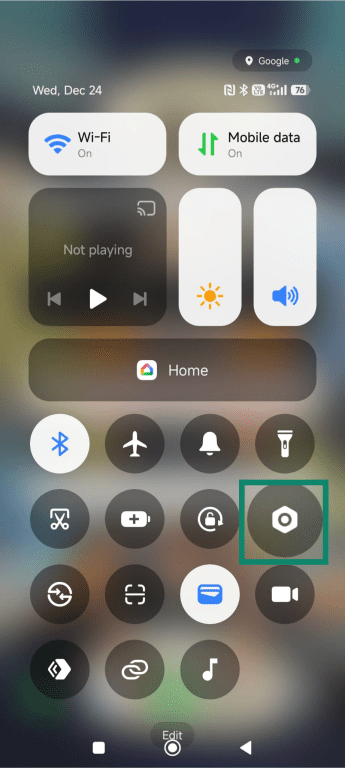
- Tap More connectivity options or Connections (the exact wording may vary by device type and OS) and tap NFC.
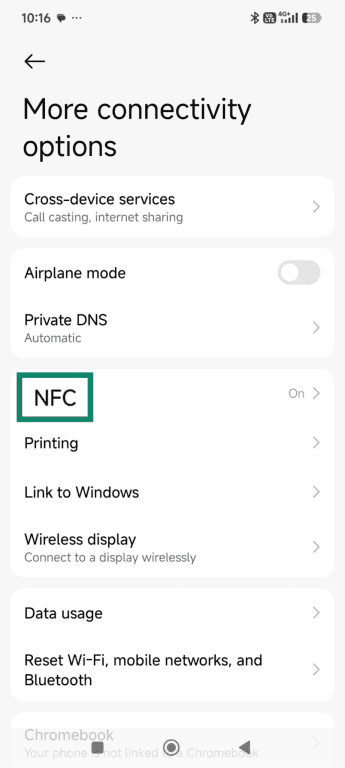
- Toggle the slider next to NFC to the off position.
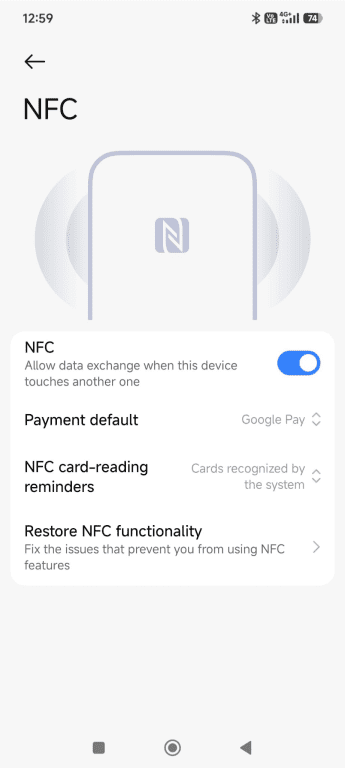
- A confirmation window will open; press the Turn off button.
Verify apps and payment terminals
Only use NFC features through trusted apps and services. Download wallet, automation, or payment apps from official app stores, and keep them updated to benefit from the latest security protections.
When making contactless payments, pay attention to the terminal itself. Avoid using NFC readers that appear damaged, altered, or placed in unusual locations. If something looks off, choose another payment method.
Use device locking and secure wallets
Mobile security is one of the most effective safeguards for NFC use. Enabling phishing-resistant multi-factor authentication (MFA) options, such as screen locking through biometrics, is the best option. If your device doesn’t support that, then lock it with a PIN or password.
For payments, use secure digital wallets that require authentication before transactions. These wallets are designed to protect payment credentials and limit what can be accessed through an NFC tap.
Avoid unknown or untrusted NFC tags
Not all NFC tags are placed by trusted sources or intended for legitimate use; tags placed in public spaces can be spoofed or have a fake tag placed over the real one. You should avoid scanning NFC tags unless you know their source or purpose, and if your phone prompts you to open a link or run an action you weren’t expecting, take a moment to review it before proceeding.
How secure connections and VPNs improve NFC safety
NFC doesn’t require an internet connection to function, but many NFC-enabled apps and payment services connect online after a tap to verify transactions, sync data, or load content. That’s where tools like a virtual private network (VPN) can help protect app traffic by securing the internet connection those apps rely on.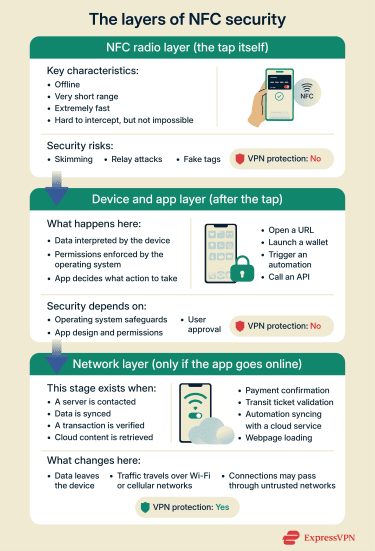
Protect data used by NFC apps
NFC interactions can trigger app activity that extends beyond the tap itself. After a tag is scanned or a payment is initiated, the NFC app may connect to online services to verify transactions, sync account data, or retrieve content.
If that connection happens over an unsecured or public Wi-Fi network, the data traveling between the device and remote servers may be exposed to interception or manipulation. While NFC apps rely on their encryption and security controls, network-level risks still exist when the underlying connection isn't trustworthy.
Using a VPN helps protect this stage of the interaction by encrypting internet traffic as it leaves the device.
Secure cloud services used by NFC payment apps
Many NFC-enabled services depend on cloud infrastructure to function. Payment authorization, fraud detection, account updates, and access logs are typically handled by remote servers rather than on the device itself.
While VPNs don’t fix cloud security flaws such as misconfigured APIs or weak authentication, they can help protect the connection between a device and cloud services when the network itself is untrusted. This reduces the risk of exposure while the data is in transit, especially on public or unsecured networks.
What a VPN can and can’t protect
When it comes to securing NFC interactions, a VPN has a limited but important role. It doesn’t protect the NFC tag or the tap, but it can help secure data if an app connects to online services after the interaction.
A VPN can help:
- Encrypt app data that travels over internet connections after an NFC interaction.
- Protect cloud-based verifications and follow-up messaging tied to NFC-enabled apps.
A VPN can’t protect:
- The NFC radio communication between a tag and your device.
- Tags, readers, or terminals against physical attacks.
- The NFC layer itself against relay or spoofing attacks.
Enabling NFC on your device
NFC can usually be turned on or off manually. While it’s mostly enabled by default, some devices ship with NFC disabled.
Enabling on Android
To check or enable NFC on Android, go to your settings and choose “More connectivity options” or “Connections.” If NFC is listed, your phone is NFC-compatible. Tap the NFC option and make sure the slider is in the On position.
Enabling on iOS
On iPhone, NFC is enabled at the system level on newer models and can’t be turned off. While users can manage how certain features use NFC, such as Apple Pay or NFC-based automations in the Shortcuts app, there’s no general NFC on or off switch.
If an NFC tag doesn’t trigger the expected action, it’s usually due to how the app or automation was set up, rather than a system-level NFC setting being disabled.
FAQ: Common questions about NFC tags
How close do you need to be for near-field communication (NFC) to work?
NFC tags only work at very short distances, usually just a few centimeters. In most cases, your device needs to be almost touching the tag or reader. This close range helps ensure that NFC interactions are intentional rather than accidental.
Can someone steal my data through NFC?
Near-field communication (NFC) interactions are difficult to intercept because of their short range, but they’re not completely risk-free. With specialized equipment and close proximity, attackers may attempt to read or relay NFC data. Keeping your device secure and avoiding unknown tags greatly reduces this risk.
Are near-field communication (NFC) payments secure?
NFC payments are designed with multiple security layers, including device authentication, tokenization, and encryption handled by payment systems. The NFC tap itself doesn't expose full card details.
Can NFC tags be hacked or cloned?
Basic near-field communication (NFC) tags can sometimes be copied or altered, especially if they’re not locked or protected. More advanced tags used for payments or access control include security features that make cloning much harder. The level of risk depends on the type of tag and how it’s used.
What devices support NFC tags?
Most premium Androids and iPhone 7 (iOS 11) and newer support near-field communication (NFC). It’s also commonly found in contactless payment cards, smartwatches, transit passes, and access badges.
How can I increase or limit NFC range?
Near-field communication (NFC) range is intentionally limited and can't be meaningfully increased through settings. To limit NFC use, you can disable NFC on your device when it’s not needed or restrict which apps are allowed to respond to NFC interactions.
Take the first step to protect yourself online. Try ExpressVPN risk-free.
Get ExpressVPN











 Support Center
  FAQ
FAQ  VPN Setup Tutorials