 Celebrate with up to 80% off
How to prevent a data breach: Practical ways to protect your business and personal data


Data breaches can expose sensitive information, including personal data, financial records, and login credentials, often resulting in financial loss, legal consequences, and reputational damage. They can affect both organizations and individuals and may result from phishing, stolen or weak credentials, unpatched software, misconfigured systems, insider activity, or accidental disclosure.
As digital systems become more central to daily operations, the opportunities for exposure grow, and the potential consequences of a breach can be significant.
Please note: This information is for general educational purposes only and does not constitute legal advice.
How organizations can prevent a data breach
Preventing a data breach works best as an ongoing routine, not a one-time project. These practices turn protection into a habit across your tools, teams, and daily operations.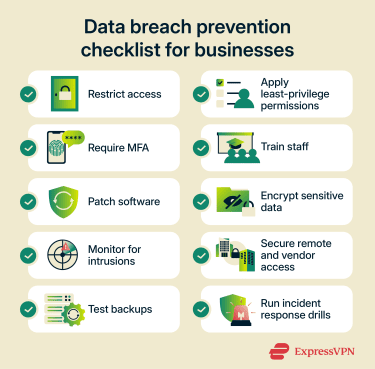
Build strong access controls
Access control is about deciding who can get into which systems. People should have accounts only on the platforms they actually need for their roles, whether they are employees, contractors, vendors, or temporary staff. For example, a finance employee who uses payroll software doesn't need to see customer support tickets. A marketing contractor working on one campaign doesn’t need broad network access.
In practice, it means:
- Giving every person their own account instead of using shared logins.
- Disabling accounts quickly when someone leaves or a contract ends.
- Keeping standard user accounts separate from admin accounts.
- Reviewing access rights on a regular schedule.
Dormant accounts can be especially risky because they may retain access long after they're no longer actively monitored.
Apply least-privilege permissions
Access control decides who gets through the door. Least privilege decides how much of the building they can walk through once inside. Every account should have the minimum permissions needed to do its job, nothing more.
This matters most for admin rights, data exports, customer records, payroll tools, code repositories, and cloud dashboards. Reduce standing admin rights where possible; use time-limited elevation or approval workflows for sensitive actions. The payoff is a smaller blast radius: if a single account is compromised (through phishing, malware, or insider misuse), tight permissions can help stop the attacker from reaching critical systems or data.
Zero-trust architecture treats least privilege as a core principle precisely for this reason. The National Institute of Standards and Technology (NIST) zero-trust guidance applies least-privilege principles to restrict visibility and accessibility, helping limit what a compromised account can reach across the environment.
Also read: How just-in-time access enhances cybersecurity.
Require multi-factor authentication
Multi-factor authentication (MFA) requires an additional factor beyond a password, or multiple authentication factors, depending on the system design. It's one of the simplest high-impact controls an organization can deploy. The Cybersecurity and Infrastructure Security Agency (CISA) calls it one of the most effective defenses against phishing attacks, brute force attacks, and stolen or reused credentials.
Given that credential abuse was the leading initial attack vector in the 2025 Verizon Data Breach Investigations Report (DBIR), appearing in 22% of breaches, broad MFA coverage should be treated as a baseline control.
Deploy MFA across every system tied to sensitive data: email, your single sign‑on (SSO) or identity provider, cloud consoles, finance and payroll platforms, HR tools, virtual private network (VPN) and remote access, code repositories, and any Software-as-a-Service (SaaS) platform holding customer or employee information. Privileged and admin accounts should be first in line, but the goal should be broad coverage, since attackers often target whichever account has the weakest protection.
Not all MFA methods are equal. SMS codes and push prompts have been bypassed at scale through SIM-swap attacks, "push fatigue" bombardment, and adversary-in-the-middle (AiTM) phishing kits. U.S. federal Phishing-Resistant Authenticator Playbook recommends moving to phishing-resistant MFA based on Fast IDentity Online (FIDO) standards, such as passkeys and hardware security keys, or public key infrastructure (PKI), such as smart cards.
These methods cryptographically tie authentication to the legitimate website, so if a user is tricked into entering credentials on a fake one, the authentication will not complete.
Train employees to recognize security risks
About 60% of breaches in the 2025 Verizon DBIR involved the human element, whether through a clicked link, a mistyped email address, misuse, or other actions that attackers could exploit. Training should be short, practical, and repeated often enough to stick.
Staff should know how to:
- Spot phishing emails, invoice fraud, and impersonation attempts.
- Recognize pressure tactics like urgency, secrecy, or appeals to authority.
- Report suspicious messages quickly, without fear of being blamed.
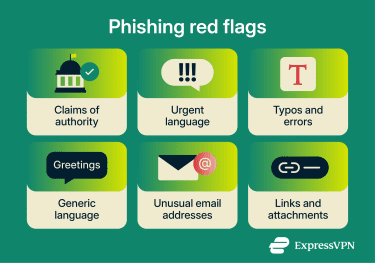 Cybercriminals are also using AI to make scams more convincing and easier to scale. The FBI’s 2025 Internet Crime Complaint Center (IC3) report logged more than 22,000 complaints reporting AI-related information. The report describes tactics including official-sounding impersonation emails, voice cloning, and deepfake-related scams. That’s why employees need to verify the sender’s identity through a separate channel, not just scan for bad grammar.
Keep software and systems patched
Unpatched software is one of the easiest ways in. Exploitation of vulnerabilities reached 20% of breaches analyzed in the 2025 DBIR, a 34% increase from the previous year.
A good patching program covers laptops, desktops, phones, tablets, servers, routers, firewalls, VPN clients, browsers, plugins, SaaS tools, and third-party apps connected to company systems. Turn on automatic updates where safe. Keep an inventory of everything that needs patching. Retire software that no longer receives security fixes and remove tools no one uses, since they add unnecessary attack surfaces.
Encrypt sensitive data
Encryption won't stop every attack, but it makes stolen data much harder to use. If a laptop goes missing, a file is intercepted, or a backup drive ends up in the wrong hands, encryption can significantly reduce the impact of the incident and, in some cases, affect whether breach-notification requirements apply.
At the organizational level, that means full-disk encryption on every managed laptop and mobile device, encrypted databases and cloud storage, encrypted backups, and Transport Layer Security (TLS) for any data moving between services or APIs.
Key management matters as much as encryption itself: store keys in a dedicated system, such as a hardware security module (HSM) or cloud key management service (KMS), keep them separate from the data they protect, and rotate them according to a defined key-management policy and cryptoperiod.
Monitor accounts, devices, and networks
You can't block every attack, so early detection matters. Organizations should continuously monitor email platforms, identity providers, cloud consoles, endpoint tools, and network logs for warning signs such as repeated failed logins, sign-ins from unexpected locations, sudden permission changes, mass file downloads, or devices that drop off management.
CISA's logging guidance recommends centralized logging and alerting because they make it easier to detect unusual activity and respond faster. For most organizations, this means feeding logs into a centralized log management system, security information and event management (SIEM) platform, or managed detection service, rather than relying on individual admins to spot anomalies in isolated tools.
Secure remote work, cloud tools, and third-party access
Remote work and cloud services expand the attack surface. Staff sign in from more places, on more networks, sometimes on personal devices, and SaaS permissions are easy to misconfigure. To reduce that risk:
- Require MFA for all remote access.
- Use managed devices wherever possible; limit what unmanaged devices can reach.
- Review cloud-sharing settings regularly, since public links and misapplied permissions can accidentally expose data.
- Lock down admin dashboards and revoke old tokens and sessions.
- Make sure staff know which tools are approved.
Third parties need the same scrutiny as internal users. Third-party involvement in breaches doubled to 30% in the 2025 DBIR, making vendor risk one of the fastest-growing concerns. Review vendor access, limit what each partner can reach, ask about their security certifications or controls, and revoke access the moment a project ends.
Also read: Security concerns in cloud computing and how to address them.
Maintain reliable backups
Backups won't prevent a breach, but they keep one from becoming a business-ending event, especially in cases of ransomware, data deletion, or accidental corruption.
A solid backup plan covers critical systems, cloud data, endpoints, and records that would be hard to rebuild. Keep versioned backups, store at least one copy offline or in a separate environment ("air-gapped" or immutable), and protect the backup system with its own access controls, as attackers often target backups first. Perform test restores on a regular schedule, because an untested backup is a guess, not a plan.
Test your incident response plan
A tested response plan can make the difference between a contained incident and a drawn-out crisis. Know in advance who makes decisions, who contacts vendors and customers, who resets credentials, who reviews logs, and who handles legal and regulatory notifications.
Run tabletop exercises on realistic scenarios (account lockouts, ransomware, a compromised vendor, a suspicious admin login) and update contact lists regularly. In the U.S., the Federal Trade Commission's (FTC) Data Breach Response guide is a practical starting point. Organizations handling personal data under the General Data Protection Regulation (GDPR) should also reference the European Data Protection Board's breach notification guidelines.
How to protect personal data
Your email account, phone, and password manager hold the keys to your financial, medical, and social life. These habits keep them locked down.
Use strong, unique passwords
Reusing passwords is the single most common way personal accounts get compromised. When one site is breached, attackers try those same credentials everywhere else. Every important account should have its own long, unique password, and the most practical way to manage that is with a password manager.
A good password manager like ExpressKeys stores your logins in an encrypted vault, can autofill them on the correct site, and flags passwords that are weak, reused, or known to have leaked. 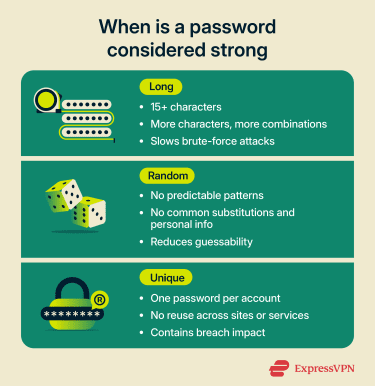
Turn on MFA for your most important accounts
If you enable MFA, you're significantly less likely to lose your accounts to common attacks because an attacker who steals a password must still satisfy an additional authentication requirement. The strongest options are typically phishing-resistant methods.
Start with your email account: if someone takes over your inbox, they can reset the password on nearly everything else. Then cover banking, payment apps, cloud storage (iCloud, Google, OneDrive, Dropbox), and social media. Where available, choose passkeys or an authenticator app over SMS codes.
ExpressKeys can help you generate and store passkeys securely and can also generate time-based two-factor authentication (2FA) codes, reducing the need for a separate authenticator app for certain accounts.
Keep your devices and apps updated
Your phone handles email, banking, messaging, photos, and saved passwords, and delayed updates leave all of that exposed. Turn on automatic updates for your operating system, browser, and apps. Replace devices that no longer receive security patches. Many newer phones now receive roughly 5–7 years of security updates, but support varies by model and manufacturer.
The same goes for your home router: check for firmware updates once or twice a year, and replace hardware that's no longer supported.
Spot phishing and social engineering
Phishing is still one of the most common ways attackers steal credentials or trick people into exposing sensitive information.
- Pause before clicking links in emails or texts, especially anything framed as urgent.
- Check the sender's full email address, not just the display name.
- When in doubt, go directly to the official site or app rather than following a link.
- Be skeptical of unexpected calls claiming to be from your bank, Amazon, the Internal Revenue Service (IRS), or tech support. Hang up and call the number on the back of your card or on the company's official website.
- Don't read security codes out loud to anyone who calls you, even if they claim to be from the company that sent the code.
Learn more: What is social engineering? A complete security guide.
Encrypt what matters
Modern phones and laptops often encrypt your data by default, but it's worth confirming: check that FileVault (macOS) or BitLocker (Windows) is turned on, and use a strong passcode or screen lock on your phone to help protect the encrypted data on iPhone and Android devices. For sensitive conversations, use messaging apps with end-to-end encryption (E2EE) like Signal or WhatsApp.
Learn more: How to password-protect a ZIP file and keep it secure.
Monitor your accounts
Turn on login and transaction alerts for your email, bank, and payment apps. Review recent activity periodically. Watch for password reset emails you didn't request: they can be an early sign that someone is trying to take over your account.
You can also check whether your email address has appeared in known breaches using free tools like Have I Been Pwned.
For a more active early-warning system, eligible U.S. users on ExpressVPN Advanced and Express Pro plans can enable ID Alerts, which include dark web monitoring and alerts about risks such as Social Security number misuse, unauthorized address changes, and suspicious financial activity.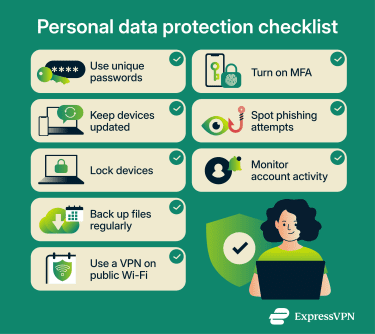
Back up your personal files
If your phone is lost, your laptop fails, or your account is locked, a clean backup lets you recover without scrambling. Use a combination of cloud backup and occasional local backups to an external drive for anything irreplaceable, such as photos, documents, and tax records. The 3-2-1 rule is a good benchmark: three copies, on two different types of media, with one stored offline or off-site.
Use a VPN on untrusted networks
Public Wi-Fi in airports, cafés, hotels, or co-working spaces is convenient, but it can still pose risks, especially on open or poorly managed networks. Home networks can also be exposed if router firmware is outdated. A VPN encrypts traffic between your device and the VPN server, which can add privacy on untrusted networks by making it harder for people on the same local network to monitor your traffic. It’s still best to use only sites and apps that support HTTPS.
For people who want broader identity-protection tools, some VPN services also bundle breach and fraud monitoring with privacy features. For example, eligible U.S. users on ExpressVPN Advanced and Express Pro plans can access Identity Defender, which includes tools such as identity monitoring, credit-related alerts or reports, automated data-broker removal, and identity-theft insurance coverage.
Data protection policies and compliance
Technology protects data, but so do clear rules and a clear legal baseline. The sections below explain how a written policy helps staff handle information properly and how compliance requirements help define the baseline obligations a business must meet.
Developing a comprehensive data protection policy
A data protection policy should be practical enough that people actually follow it. At a minimum, it should cover:
- Data inventory: What data the company collects, who can access it, and how long it's kept before deletion.
- Storage and sharing: Rules for secure storage, sharing, and transfer, internally and with third parties.
- Day-to-day controls: Password requirements, MFA, encryption standards, approved apps, and rules for personal devices and remote work.
- Operational processes: Vendor onboarding, access reviews, phishing reporting, incident escalation, and clear roles and responsibilities.
- Data classification: How sensitive data is categorized, and what extra steps apply to each category.
- Compliance and rights: Any retention, notice, and individual-rights obligations that apply under relevant laws.
Staff should know which category a given piece of data falls into and what's expected of them for each one. A clear policy reduces guesswork, and when people have to make up the rules as they go, mistakes happen.
Common compliance requirements
Compliance duties vary by country, state, sector, and data type. A small retailer, a law firm, a hospital, and a SaaS company can each face very different obligations. Common ones include:
- General Data Protection Regulation (GDPR): Applies to organizations that process the personal data of people in the EU in certain circumstances, including some organizations based outside the EU.
- Health Insurance Portability and Accountability Act (HIPAA): Its Security Rule applies to U.S. healthcare providers, health plans, healthcare clearinghouses, and their business associates that handle electronic protected health information (ePHI).
- Payment Card Industry Data Security Standard (PCI DSS): This standard applies to organizations that store, process, or transmit payment card data, or that could affect the security of that data.
- U.S. state privacy laws: California's Consumer Privacy Act (CCPA), along with many other state privacy laws, may apply to businesses that meet certain revenue, data volume, or other thresholds.
- Sector-specific rules: For example, the Gramm-Leach-Bliley Act (GLBA) for certain U.S. financial institutions or the Sarbanes-Oxley Act (SOX) for public companies.
Also read: Data sovereignty: What it is and compliance considerations.
FAQ
How often should a company review its data security practices?
What are the first warning signs of a possible data breach?
Can small businesses prevent data breaches without a large IT team?
Does cyber insurance help after a data breach?
Which employee mistakes lead to data breaches most often?
How to prevent a data breach in healthcare?
Connected medical devices and telehealth tools need the same scrutiny as laptops. In the U.S., most of this is shaped by the Health Insurance Portability and Accountability Act (HIPAA) Security Rule.