What can someone do with your IP address? Real risks and how to stay protected


Though they’re foundational to a functioning internet, many people don’t understand what Internet Protocol (IP) addresses are or how they work. At the same time, there’s a fair amount of fearmongering about what someone can do if they know your IP address. As a result, it can be difficult to separate the exaggerated claims from the truth.
What can someone do with your IP address?
An IP address is a unique numerical label assigned to a device or network connection to ensure that internet traffic reaches the right place. When you visit a website, the site uses your IP address to send the right data to your browser.
An IP address can reveal privacy-relevant information, but it isn’t a password or a key that provides access to a device. It’s more of a network clue, something that becomes more useful when paired with other data, such as cookies, account activity, browser details, and public posts. Attackers may also use leaked IP addresses to launch targeted attacks.
There are various risks, most of which fall into a few broad categories.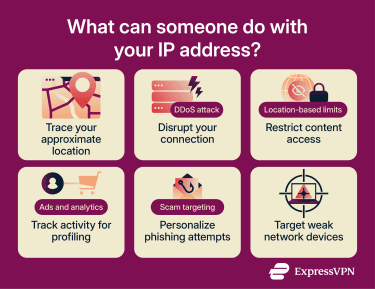
Trace your approximate location
Anyone can use free websites to look up the geographic area associated with an IP address. These services rely on public routing data and other network signals to connect various IP ranges to specific regions.
In most cases, an IP address can reveal your approximate location, such as your country, region, or city. Someone looking up your IP won’t see your exact street address or highly specific details.
An IP address may point to your internet provider’s network hub or registered service area, which could be nearby or in another city. Accuracy varies by provider, database, region, and connection type.
Mobile connections can be even less precise. While using mobile data, you may be given an IP address tied to your carrier’s infrastructure in a city far from your actual location.
For a potential stalker, an IP address might be one piece of the puzzle. For example, a threat actor may suspect that an otherwise anonymous forum account belongs to a specific person. If public social media posts show that the person lives in Milan, the threat actor may compare that information with an IP address harvested from the forum. If the IP lookup also points to Milan or a nearby area, it may become easier to connect the forum account to the person’s real identity.
Disrupt your connection with a DDoS attack
A distributed denial-of-service (DDoS) attack floods an IP address with traffic. If a website gets hit by a DDoS attack, it may become inaccessible. Public sites are the most common targets, but an attacker may also use an IP address to target a home network. This could slow the connection to a crawl.
For most internet users, the risk of this type of attack is very low. It’s more likely to affect public figures, livestreamers, competitive gamers, and people who host services from their own network.
A common scenario involves one gamer learning another player’s IP address and using it to knock the opponent offline.
If a website, game server, or other public-facing service is hosted from a personal network, DDoS protection may be handled by the hosting provider. Home users usually have fewer built-in protections, though some internet service providers (ISPs) may be able to help during an attack.
Restrict access based on your location
Websites and online services use visitors’ IP addresses to estimate where they’re connecting from. They may use this information to alter the content that users are shown.
A site may show a local version of a page, apply regional pricing, or display location-based ads. Many will also limit access to content based on country or region. Some block access for users in certain areas. Sites generally do this to manage licensing agreements and ensure compliance with local laws. It can also be a security measure, such as when a bank requires extra verification for a request originating from an IP address in an unexpected country.
Curating content by region can improve user experience by providing relevant information. But this IP-based discrimination can also be frustrating. A site may make false assumptions about you based on your location, for example.
Track activity for ads and profiling
IP address tracking can help advertisers, analytics providers, and websites connect on-platform activity to broader profiles. They may combine an IP with cookies, device details, and browser fingerprints to place a visitor or device into specific audience groups. The more data that can be gathered, the more detailed the profile can become.
A single IP address rarely identifies you with absolute certainty. Some people share a connection with household members, coworkers, hotel guests, or other mobile network customers. Internet providers may rotate IP addresses, and Carrier-Grade Network Address Translation (CGNAT) can result in many users sharing a public IP address.
Use it in phishing and scam attempts
Knowing a victim’s IP address helps scammers launch attacks that feel more personal. A phishing email or fake Apple security alert might mention the recipient's city or internet provider to appear more convincing. The goal is to make the message seem more legitimate, increasing the chance that the recipient clicks a dangerous link, provides personal information, or downloads a suspicious file.
For example, a fake message may say: “Suspicious login detected from Rome” or “IP address 192.0.2.5 has been exposed.” The scammer doesn’t need access to your device to see this information, but some users are unaware of this fact.
This is where cybersecurity risks overlap with social engineering. The IP address is bait. The real danger starts when someone is convinced to share a password, approve a login, download malware, or enter payment details on a fake site.
Target weak devices on your network
Attackers may use an IP address to scan for open ports, which let network traffic reach a service or device. Some ports are necessary for normal internet use, while others pose a risk by exposing remote desktop tools, cameras, or router settings.
Most home networks use NAT technology and firewalls to separate private devices from the wider internet and block unwanted inbound traffic. However, weak passwords, outdated router firmware, exposed services, and poorly configured smart devices can increase the risk of unauthorized access.
Some routers and devices use Universal Plug and Play (UPnP) to let apps or devices automatically request port openings. This can be convenient, but it may also expose services unintentionally if a device is compromised or poorly configured.
In other words, an IP address identifies the network; the real risk lies in the vulnerabilities behind it.
What your IP address reveals and what it doesn’t
There are many misconceptions about what an IP address can reveal. On its own, it usually points to a network or provider rather than a specific person. It may offer clues about location, connection type, or ISP, but it doesn’t directly expose private details like a name, exact address, passwords, or files.
Your internet service provider
Your IP address may indicate the company that assigned it, such as a broadband provider, mobile carrier, workplace network, or hosting provider.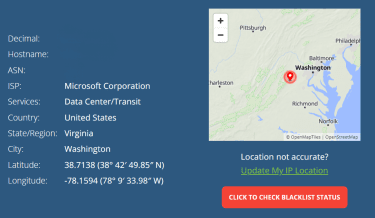
This doesn’t mean a stranger can see your ISP account details, your billing address, or subscriber records through a public IP lookup.
An ISP has much greater network-level visibility. In many normal browsing setups, it can see connection metadata and may be able to infer the domains of websites visited, though HTTPS hides specific pages, messages, passwords, and other page contents. ISP records may also include the billing address linked to the account. In most cases, ISPs may share this information when legally required.
Whether you are using a public or home network
Someone looking up your IP address may be able to infer the type of network behind it, such as a home connection, a mobile carrier, a workplace network, a hosting provider, or a virtual private network (VPN). However, IP lookup tools usually can’t reliably confirm whether a connection is from a specific public Wi-Fi network, such as a café, hotel, school, or airport.
For example, if you’re using home Wi-Fi, a website may see the public IP address assigned to your router by your ISP. The website won’t know the router belongs to you unless other signals, such as cookies, account records, or login activity, connect the network to your real identity.
What your IP address cannot reveal
A public IP lookup doesn’t directly reveal:
- Your exact home address.
- Your full name.
- Your phone number.
- Your passwords.
- Your bank details.
- Your private messages.
- Your files or photos.
- Your browsing history.
- Who is using the connection at a specific moment.
The important caveat is that some of these details may be linked to an IP address when other data is available. This is especially relevant on sites where you log in. If a real name has been mentioned on a forum, for example, an admin may be able to link that identity to the IP address associated with the account.
That said, multiple pieces must come together before an IP address can be reliably linked to sensitive personal details.
How can someone get your IP address?
Learning someone’s IP address can be easier than many people assume. Legitimate businesses regularly log customer IP addresses for security, fraud prevention, analytics, and troubleshooting, though privacy laws may require a valid legal basis or consent depending on how the data is used.
Threat actors may collect the same information for malicious purposes. Though there’s no surefire way to determine a specific person’s IP address, there are several methods people use.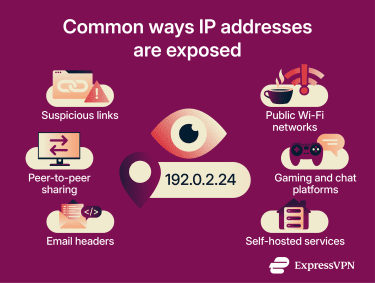
Clicking on suspicious links
When a browser or app loads a page, image, file, or other online resource, the destination server can see the client’s public IP address. That’s just how the web works.
Some pages are built simply to log IP addresses. Links to these may be posted publicly to harvest IPs at scale or sent to a specific person to collect that person’s address.
They may look like ordinary pages, images, or harmless landing pages. But any website can potentially record the IP address, visit time, requested page, browser or app details, and some device or network signals exposed by the request.
Many suspicious links go further, leading to pages that attempt drive-by downloads, malware delivery, credential theft, or other attacks. Others remain non-threatening, so visitors may not see anything suggesting their information is being logged.
Through public Wi-Fi networks
Most of this article focuses on public IP addresses, which are visible to websites, apps, and online services. Devices on a network usually share a single public IP address, but each device has a local IP address within that network. Local IP addresses are normally not visible to anyone outside the network.
When you join a café, hotel, airport, or other public Wi-Fi network, websites usually see that network’s shared public IP address. Within the network, the hotspot operator can use admin tools to view the local IPs of every connected device. If the network lacks client isolation or is poorly configured, other users on the same network may be able to discover nearby devices or see local network details.
From gaming and chatting platforms
Gaming services and some chat or voice platforms can expose IP addresses in certain setups, especially when they use direct peer-to-peer (P2P) connections. In these setups, participants connect directly rather than only through a central server.
This usually requires the software to exchange network information, which may expose public IP addresses to other participants if no relay or masking system is used.
Many major platforms now use relays, dedicated servers, or other routing methods to reduce direct exposure. That said, IP exposure can still occur in older games, in direct-connection features, on community servers, or with poorly configured services.
Players who use community-hosted servers may face greater IP exposure. For example, the operator of a small game server or voice server may see connection logs that include IP addresses.
Also read: How to stay safe when gaming online.
Hosting a website or server from your own network
If you host a website, game server, media server, or other service from your own home network, your public IP address may be easier to find. That’s especially true if you publish the server address, point a domain name to your home connection, or share connection details in a public forum or gaming community.
This doesn’t mean self-hosting is inherently unsafe. The risk depends on how your server is configured. A public server may need open ports so other people can connect, but those same openings can attract scanning, login attempts, or abuse if the software, router, or firewall settings are weak.
If you don’t need a service to be reachable from the open internet, don’t expose it. Use strong passwords, keep server software up to date, review port-forwarding rules, and, where possible, separate public-facing services from devices that store personal files.
Via email headers
Email headers can contain routing information about where a message came from and which servers handled it. Sometimes they reveal the sender’s IP address, though this is less common with major webmail providers today. Large webmail services generally show their own mail server information rather than the sender’s personal IP address. Still, self-hosted mail servers, third-party mail clients, or some relay setups may expose more.
Torrenting and peer-to-peer sharing
Torrenting is a neutral technology used for both lawful purposes, such as distributing open-source software or large research datasets, and unlawful file-sharing. Regardless of the use case, torrenting typically exposes your IP address to other users in the same swarm. That’s part of how P2P sharing works: devices connect directly or semi-directly to exchange pieces of a file.
As such, your peers may be able to see your IP address. Additionally, third parties often monitor public torrent swarms. Your ISP may also detect traffic patterns associated with P2P activity and, depending on the provider and local rules, apply bandwidth management or throttling to certain types of traffic or at certain times.
Can someone hack you with your IP address?
Usually, no. An IP address alone doesn’t give someone access to your device, accounts, or home network. But it can become part of an attack path if your network has weak spots.
When an IP address becomes a real security risk
An IP address becomes more useful to attackers when it points to a network with exposed services, outdated devices, weak passwords, default router credentials, remote administration, or poor firewall settings.
A router with a default admin password, a smart camera with outdated firmware, or a public remote desktop tool all pose a greater risk than a leaked IP address itself. A threat actor may use an IP address to scan the network and look for these weaknesses.
In other words, the IP address identifies the network; exposed or poorly secured services create the actual attack path.
Signs someone may be targeting your network
If a threat actor is probing or targeting a network, there may be signs of unusual activity, though simple scanning may not always be visible.
Warning signs to look out for include:
- Unexpected router admin logins.
- New devices connected to the Wi-Fi network.
- Router settings changed without explanation
- Security alerts from an ISP, router app, or device protection tools.
- Unusual traffic spikes.
- Repeated connection dropouts with no clear service issue.
- Smart devices behaving unexpectedly.
These signs can have many causes. A slow connection may be a normal ISP issue. An unfamiliar device name on a Wi-Fi network may be a smart TV, printer, phone, or other known device. But patterns matter. If several signs appear together, it may be worth checking router settings, updating firmware, disabling unnecessary remote administration, changing affected passwords, and contacting the ISP.
How to protect your IP address
You don’t need to hide from the internet to protect your IP address. The goal is to reduce unnecessary exposure, make tracking harder, and close weak spots in your network.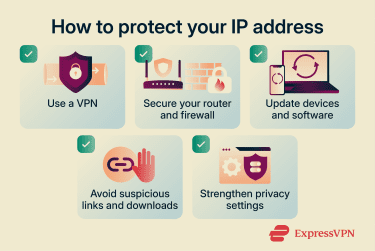
Use a VPN
A VPN masks your real IP address from websites, apps, and other online services by routing your traffic through a VPN server. When connected, the sites you visit will see the VPN server’s IP address instead of your home or mobile IP address.
Proxies can also hide an IP address from some websites. They generally protect less traffic than VPNs and often don’t offer the same level of encryption, so the two serve different purposes.
VPNs can also help protect online privacy in everyday situations. On public Wi-Fi, the operator may still see that your device is connected to a VPN server, along with basic metadata such as timing and data volume. However, the VPN helps prevent the operator from reading the contents of the protected traffic. On forums, apps, or games, a VPN can also reduce direct exposure of a home or mobile IP address to other users.
A VPN can also reduce what an ISP can see about your online activity. The ISP can still see the VPN connection itself, but it generally can’t see the final websites or contents routed through the VPN tunnel.
That said, it’s important to understand that a VPN doesn’t make you invisible. Websites can still track users through cookies, account logins, browser fingerprinting, and other signals. A VPN won’t stop phishing or secure an outdated router.
Also read: Does a VPN protect you from hackers? The truth about online security.
Secure your router and firewall
Start with the router: change the default admin password, keep firmware updated, use strong Wi-Fi encryption, remove unfamiliar devices, and disable remote administration if it isn’t needed. For Wi-Fi security, use Wi-Fi Protected Access 3 (WPA3)-Personal, where available, or WPA2 with Advanced Encryption Standard (AES) if WPA3 isn’t supported.
If you don’t run a home server, remote desktop service, or internet-facing camera, you probably don’t need open inbound access from the wider internet. Closing what you don’t use reduces the attack surface.
Keep your devices and software updated
Security updates fix known flaws in operating systems, browsers, routers, apps, and smart devices. Attackers often scan for old vulnerabilities at scale, meaning a device can still be at risk even if it isn’t being targeted personally. They only need to find an unpatched device.
Turn on automatic updates where possible. Check routers and smart devices manually if they don’t update automatically. Replace devices that no longer receive security updates, especially routers, cameras, and network storage devices.
Avoid suspicious links and downloads
Treat unexpected links with care. Be especially cautious of messages or links that use fear, urgency, threats, or the promise of prizes to get you to click. Loading a link or online resource can expose the public IP address used for the connection, even if nothing else happens.
If malware infects a device, its network communications may reveal its current public IP address to cybercriminals, potentially exposing each network it uses.
Use stronger privacy and browser settings
Your IP address is only one tracking signal. Browser privacy settings can reduce some tracking tied to your IP address, device, and browsing habits, but they won’t hide your IP address or stop all tracking.
Block or limit third-party cookies where possible. Review site permissions for access to the location, camera, and microphone. Limit ad personalization in frequently used accounts. Use privacy-focused browser settings that reduce cross-site tracking.
These settings can limit some data collection, but they won’t stop all fingerprinting, account-based tracking, ISP visibility, or tracking that happens after you log in to a service.
Also read: Private browser: Your best options for online privacy.
What to do if someone has your IP address
If someone has your IP address, don’t panic. In most cases, there’s no need to replace devices or perform drastic account actions. Start with a few practical steps that can reduce further risk.
Contact your ISP
The public IP address assigned to a home connection is usually controlled by the ISP. Some connections use dynamic IP addresses that can change, but restarting the router doesn't guarantee a new one. Many ISPs may assign the same address again, depending on the connection type, lease settings, and provider policies.
If harassment, DDoS threats, or repeated connection targeting continues, contact your ISP. The provider may be able to check for unusual traffic, advise on protective measures, or, depending on the connection and policy, assign a new IP address.
Change the IP address others see
You can change the IP address websites and apps see by using a VPN or switching networks. Mobile networks may change the visible IP addresses more often than home broadband connections, though this depends on the carrier and network setup. But with many home broadband connections, changing the actual public IP address is not fully under your control and may require contacting your ISP.
Changing the IP address others see can help when the problem is direct targeting, such as someone trying to knock your connection offline. It won’t fix compromised accounts, infected devices, weak passwords, or leaked public personal information.
Monitor for unusual activity
Watch for connection drops, router changes, new devices, and strange account alerts. Check login history for important accounts and enable multi-factor authentication (MFA) where possible.
If someone may have more than an IP address, such as a password, email address, phone number, or personal documents, treat it as a broader account security issue. Change affected passwords, sign out of unknown sessions, and check recovery settings.
FAQ
Can someone track my exact home address from an IP address?
Can a website see my IP address?
Can someone watch what I do online with only my IP address?
Does a VPN completely hide my IP address?
Is it legal to look up someone’s IP address?