Digital safety resources every activist should know about


Activists face a growing mix of digital and physical threats. Targeted surveillance and spyware, doxxing and harassment, phishing and account takeovers, platform censorship, and even device loss or theft are increasingly reported.
As technology evolves, these risks continue to change and expand. Cyberattacks may expose sensitive data, disrupt campaigns, or put individuals and groups at risk. That’s why digital safety plans need to be both proactive and practical.
This guide lists 40+ tools and resources to help secure communications, protect accounts and devices, reduce tracking risks, and maintain access in challenging digital environments.
Understanding the common threats in activism
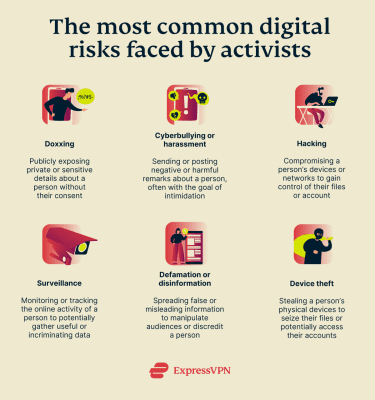
Threat modeling is an important first step to building a plan to protect yourself. Identifying which threats you’re most susceptible to can help you determine what level of operational security (OPSEC) you require, what measures to prioritize, and how to implement them.
OPSEC is the practice of creating systems to protect sensitive information that adversaries may seek to exploit. For activists, this means being careful about what, how, and with whom information is shared. It helps safeguard data, reduce exposure to surveillance and legal risks, and builds trust within groups by controlling information flow.
It’s important to understand the types of risks activists typically face and the scenarios that may apply specifically to you or your organization.
The digital risks of activism
The nature of activism (the practice of taking action about social, political, economic, or environmental problems) means that threats to safety are typically seen as part of the reality. After all, activists often find themselves facing adversaries that are bigger and more powerful than they are, such as large private companies, hacker groups, or organized opposition.
Advocacies relating to land and environmental protection are considered high-risk. Between 2024 and 2025, Latin American countries were among the deadliest for environmental defenders. Human rights advocates are equally at risk, with at least 300 killed globally within the same period.
But the accelerating pace of digitalization worldwide has introduced another facet: activists now face risks digitally as well as "just" physically.
UN Women reported in 2025 that 70% of women activists and advocates experience online violence, while 40% reported real-life attacks that they believed were connected with digital threats.
In the Philippines, the phenomenon of "red-tagging" has garnered worldwide attention and concern from human rights groups. "Red-tagging" refers to the act of publicly labeling and accusing activists, human rights defenders, and other environmental advocates of being armed rebels or members of the country’s communist guerrilla fighters. This often happens on social media platforms like Facebook.
Red-tagging has been linked to a slew of credible threats and attacks. In a notable case in 2025, a trans rights activist, who also advocated for the rights of Muslim Filipinos and indigenous groups, was killed after years of receiving threats online for her activism.
Doxxing is another common problem activists face. In some cases, opposition groups may try to photograph or identify individuals participating in organized actions, later leaking their private information online to incite bullying or harassment.
Activists might also find false and slanderous information published about them. In such cases, they may face difficulty finding work or continuing with their lives as normal, even after debunking the online misinformation.
The threats relevant to your situation
Overall, activists worldwide face many different kinds of threats. However, not all scenarios apply to everyone. It depends on your exposure, level of engagement, whether you hold a leadership position in known activist groups, and the specific adversaries of your activist work.
And while it’s good to prepare for a range of possibilities, taking extreme measures may not always be necessary, especially if they are disproportionate to your situation. In many cases, this can make it harder to perform your tasks efficiently. So, it’s best to narrow down the threats you’re most likely to face.
The table below provides guidance on questions you can ask yourself to better understand your risk scenarios and how to strengthen your protection.
| Example | Why It Matters | |
|---|---|---|
| What do you need to protect? | Personal information, messages, files, contacts, photos | Identifying your most critical assets can help you focus your security efforts on what may be most vulnerable. |
| What entity poses the biggest threat to your data? | Hacker groups, cybercriminals, private corporations, data brokers | Different threats require different defenses, often depending on the skill level and motivation of the threat actor. |
| How severe would the consequences of an attack be? | Losing critical files, exposing sensitive personal data or plans | Considering the potential impact can help you determine how much protection effort is justified. |
| How likely is it that the threat will be realized? | Guaranteed and imminent, extremely likely, possible but not yet likely | Estimating likelihood can help you prioritize defenses where risks are most realistic. |
| What measures are you incapable of taking? | Having dedicated devices, running virtual machines, switching operating systems | Identifying these gaps can help you focus on measures that are practical and sustainable. |
| What measures are you capable of taking? | Strong passwords, two-factor authentication (2FA), privacy-first software | Listing these steps can help you prioritize actions based on practicality and ease of implementation. |
| Who are your allies? | Friends and family, colleagues, professional networks | Support networks may offer advice, assistance, or tools you might not otherwise have access to. |
The Secure Communications Framework (SCF) shown below is another useful tool for performing a risk assessment. By assessing the capabilities of potential threat actors versus the potential impact of a data breach or exposure, you can identify the level of OPSEC you require.
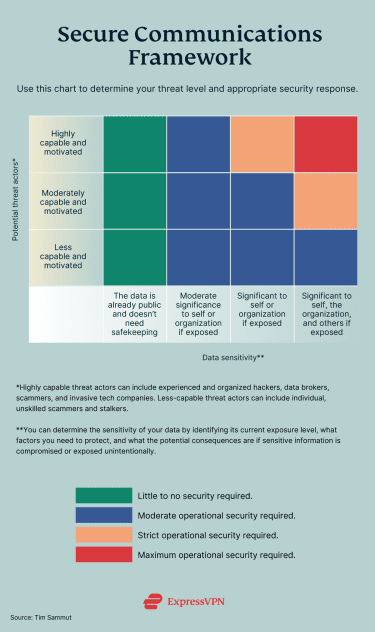
If you remain unsure of your specific threat level after performing the two self-assessments above, it may be helpful to consult with your organization or colleagues. Your peers or allies may be able to spot vulnerabilities and risks you haven’t considered.
Digital safety guide for activists according to threat levels
As an activist, the research you do, the data you store and transmit, and the fact that you may have a substantial online presence can increase your digital exposure. Good security habits lay the groundwork for protecting yourself against a variety of threats, but you need to pair them with appropriate tools to achieve more comprehensive protection.
In this section, we’ll go through digital safety tips and tool recommendations for activists at every threat level. A combination of the tools outlined in the sections below can help protect you from multiple attack vectors.
While we’ve tried to outline what may be most important in each section, keep in mind that your own threat level will determine how comprehensive your security approach needs to be.
Moreover, the examples we provided for every non-VPN service or tool were chosen based on perceived popularity, especially among activist groups. We did not conduct a systematic evaluation of each option, and we encourage you to research these and other tools to find the one that fits your needs best.
Keep in mind that as your threat level rises, you’re likely to need more tools and increasingly sophisticated systems. As such, individuals or organizations with stricter OPSEC requirements may also benefit from reviewing recommendations for less strict scenarios.
For instance, if you believe you have strict or maximum OPSEC requirements, it can still be useful to review recommendations for basic and moderate levels. These tips and recommendations are not intended to be used in isolation, but rather as building blocks for building a more robust system for yourself or your group.
Activists requiring basic OPSEC
This section focuses on recommendations for activists requiring relatively basic security measures. This includes individuals who are:
- Members of broad-front, established groups with significant coverage or funding.
- Mainly engaging in digital campaigns to raise awareness about certain issues.
- Facing adversaries with minimal funding or private/corporate backing.
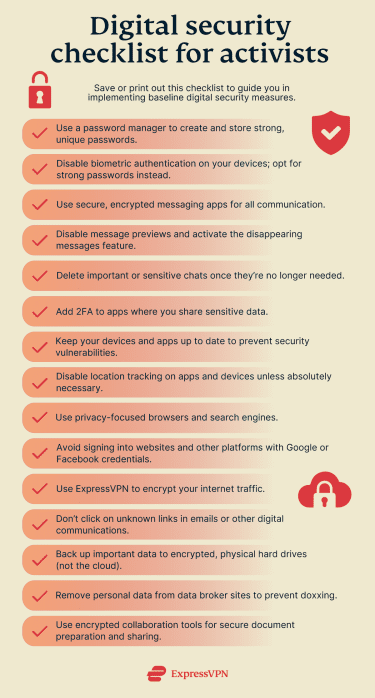
As mentioned above, however, many of these tools are also essential for those with higher OPSEC requirements, as they can help establish a strong baseline level of digital security.
A core element of activism is speaking truth to power. When that’s done online, it can be easier for those who oppose your views to counter or suppress your message. In some cases, this may include spreading misinformation or manipulated content to create confusion.
But in other, more extreme instances, this can involve targeting individuals directly through harassment or threats related to doxxing. There may also be attempts to undermine your credibility by obtaining and leaking sensitive information.
These dynamics can lead to outcomes such as reduced visibility, loss of trust, or disruption of communication.
To help reduce these risks, it’s important to be proactive in protecting your digital footprint and securing your online assets. Below are tools that can support these efforts:
| Useful tools | Purpose | Example/s |
| Secure browsers | Limit data collection, block trackers and fingerprinting, enforce HTTPS usage, sandbox threats, and support enhanced privacy browsing. | Brave LibreWolf |
| Password managers | Generate and store unique, strong passwords and passkeys, and securely autofill credentials to reduce reuse and credential theft. | ExpressKeys Bitwarden KeePassXC |
| 2FA apps | Create one‑time codes (sometimes push approvals) that add a second login factor that is harder for attackers to access. | Authy Aegis Google Authenticator |
| VPNs | Encrypt your internet traffic to a remote server, helping mask your IP address or location and improve security on public or untrusted networks. | ExpressVPN |
| Encrypted messaging and email | Protect conversations with end‑to‑end encryption (E2EE) and offer features like disappearing messages and participant verification to ensure only validated participants can access communications. | Signal Element (Matrix) Tutanota |
| Email aliases | Create forwarding addresses that mask your real email, helping reduce spam and limit the impact of data breaches. | ExpressMailGuard SimpleLogin AnonAddy |
| Anti‑phishing tools | Identify and block deceptive emails, links, and sites to help prevent account takeover. | PhishTank VirusTotal |
| Malware detection programs | Find and block malicious software before it can compromise your data or devices. | Malwarebytes Hypatia ClamAV |
Secure browsers
Tracking cookies, browser fingerprinting, unencrypted connections (HTTP instead of HTTPS), malicious scripts, and ads are all potential threats you may be exposed to when using a standard browser.
Cookies and browser fingerprinting are used to build profiles of users. They can reveal your browsing habits and expose your personal information, compromising your digital security. Moreover, unencrypted websites transmit data in plaintext, making it vulnerable to interception by hackers on shared or public networks.
All this can expose sensitive information (like passwords, credit card numbers, or personal details) to theft, tampering, and surveillance.
Many modern browsers enforce HTTPS by default, but using a secure browser can help to mitigate threats from tracking and malware. They often block cookies and minimize browser fingerprinting, making it more difficult for third parties to monitor your online activities.
Sandboxing is a key feature of these browsers. It creates an isolated environment where each browser tab runs separately from the rest of your computer. So, when you visit a website, any potentially malicious code is executed inside a restricted space to help prevent access to your files, passwords, or operating system. Even if you accidentally visit or interact with a harmful site, the threat is more likely to remain contained within that tab.
Password manager and authentication tools
Access protection tools are essential for safeguarding digital accounts and systems from unauthorized access. Poor security can make it easier for attackers to access sensitive data, potentially exposing personal identities, strategic plans, and communication networks.
For instance, weak passwords can be easily guessed or cracked, and the absence of multi-factor authentication (MFA) leaves accounts vulnerable if passwords are compromised.
To counteract these threats, activists can use password managers to generate and store strong, unique passwords for each account. These tools can also help reduce phishing risks by autofilling passwords only on recognized websites.
2FA apps like Google Authenticator add an additional layer of security. These apps generate time-sensitive codes or require a secondary form of identification, making unauthorized access more difficult even if a password is exposed.
Virtual private network (VPN)
Surveillance can hinder activists’ ability to access or communicate important information. This may affect how effectively individuals can organize and share information.
A VPN helps to address these risks by routing your internet traffic through an encrypted tunnel, helping prevent others from easily monitoring your online activities or tracking your internet usage.
In addition to strong encryption protocols and a large network of servers, there are a few other features to consider when choosing a VPN. The provider should have a strong no-logs policy. This policy states that the VPN doesn’t log or store user activity data, which can reduce the risk of that data being accessed or exposed.
A kill switch is another important feature. It disconnects your device from the internet if your VPN connection drops, helping reduce the risk of your real IP address being exposed or traffic being transmitted without encryption.
Encrypted communication tools and aliases
Insecure networks (like public Wi‑Fi or those set up on compromised routers) can allow attackers to position themselves between your device and the internet to observe traffic. This means they might be able to read traffic that’s flowing from point to point, increasing the risk of sensitive data (logins, messages, and metadata) being intercepted.
For example, keystrokes can be captured by keyloggers, screens by screen‑capture malware, chats and call logs by malicious apps or spyware, email and cloud files via hijacked sessions, and clipboard contents by clipboard loggers.
These techniques may be used to reveal identities, map networks of relationships, and tamper with data; for example, altering messages or documents in ways that spread disinformation or misrepresent activists.
To counter these threats, you can use E2EE messaging and email apps for sensitive communications, as well as secure file‑sharing apps that encrypt data in transit and at rest. Email aliases can also help limit exposure by masking your primary email address.
Anti-phishing tools
Phishing is a social‑engineering attack where an adversary impersonates a trusted source to trick activists into revealing login details, personal data, or installing malware.
Defending against phishing is important because a single compromised account can expose contact networks, sensitive plans, and locations. This potentially allows surveillance, harassment, or disruption of ongoing work.
A major phishing attack was recently documented by the University of Toronto’s Citizen Lab. The organization found that COLDRIVER, an advanced persistent threat (APT) group, used advanced spear-phishing to target civil society groups. This included opposition figures, NGO staff, media organizations, and more.
The attackers impersonated people close to the targets, such as colleagues, funders, or government employees, using fake email accounts and documents. These documents contained links to credential-harvesting pages designed to imitate legitimate email login pages.
Microsoft and the U.S. Department of Justice later seized over 100 phishing domains. Following this, the attackers shifted to a WhatsApp spear‑phishing scheme that abused QR device‑linking to hijack accounts.
Anti-phishing tools can be effective in helping defend against these attacks. They may preview link destinations before loading pages, flag look-alike domains, and block fake login pages.
Malware detection tools
Malware (short for "malicious software") is designed to infiltrate a device or network to steal data, surveil activity, disrupt operations, or extort payment through ransomware. Common types include:
- Viruses: Often attached to legitimate files and executed when opened, potentially spreading, corrupting, or deleting data.
- Trojans: Disguised as legitimate apps or attachments but designed to steal credentials, log keystrokes, or install backdoors.
- Worms: Self-replicating programs that spread across networks via email attachments, downloads, or infected storage.
Some signs of a malware infection include sudden system slowdowns, unusually high data usage, unknown apps or processes running in the background, redirected browsing, and unexpected pop-ups. You might also notice that your battery drains faster than usual or that your device is running hotter. That said, many of these programs can be difficult to detect without specialized software.
Anti-malware tools usually combine multiple detection methods and can run both on‑demand and in real time. They use signature-based detection to identify known threats, heuristic analysis to identify suspicious code patterns, and behavioral monitoring to flag activity consistent with malware.
For example, a scanner may quarantine a file that suddenly encrypts a large number of documents (ransomware behavior) or modifies startup entries and system settings (typical of Trojans and worms), even if the exact threat has not been previously identified.
Activists requiring moderate OPSEC
This section focuses on recommendations for activists requiring more advanced security measures. This includes individuals who are:
- Public-facing leaders of organized actions or mobilizations.
- Regular attendees or participants of in-person organized actions or campaigns.
- Facing adversaries with significant funding or private/corporate interests.
Default E2EE and basic security hardening are often recommended for individuals or organizations with moderate OPSEC needs. Activists often store and share sensitive data, so reducing risk across the entire network is important. This means ensuring that devices and accounts are consistently secured across participants.
Attacks at this level may reveal your location, private chats, contacts, files, and behavioral patterns. If you regularly attend in-person campaigns or events, this information may be used to track or identify you in real-world settings.
The tools below can help limit surveillance exposure, reduce the amount of data that could be compromised, and improve device resilience. Many of the recommendations are more sophisticated versions of tools for basic OPSEC, adapted for higher-risk environments.
| Useful tools | Purpose | Example/s |
| Secure operating systems | Create hardened or compartmentalized systems that help protect data and control access; they may include strong encryption and sandboxing (isolating applications). | Tails Qubes OS Whonix |
| Anti-spyware tools | Detect, block, and remove programs that may monitor activity, track keystrokes, or steal personal data. | Certo AntiSpy Kaspersky Mobile Security Malwarebytes Mobile Security |
| Device tracking tools | Locate lost or stolen hardware to help with recovery or other incident response decisions. | Prey Project Find My Device (Android) Find My (Apple) |
| Anonymity networks | Route traffic through layered relays to help obscure your IP address and origin metadata. | Tor browser I2P |
| Encrypted storage and file sharing tools | Encrypt files before uploading or sending so only those with the correct decryption key can unlock them. | Tresorit OnionShare |
| Private collaboration software | Enable E2EE for notes, docs, and boards so teams can share and edit in private. | CryptPad Wire (Teams) |
| Offline or mesh networks | Share messages or files between devices without the internet, forming ad‑hoc networks that work during outages or shutdowns. | Briar LibraryBox |
| Metadata removal tools | Strip metadata (location, device, author) from files and images before sharing to help reduce tracking and doxxing risk. | MAT2 Metadata Cleaner Exiftool |
| Data removal tools | Locate and delete sensitive data from devices, clouds, and public sites, reducing exposure from leaks or seized accounts. | DeleteMe Optery Privacy Bee |
Secure operating systems
Secure operating systems form the foundation of your digital security framework. Even if other tools fail, a secure OS can help your device be more resilient.
It isolates sensitive information from untrusted software, often includes default encryption features, and can help minimize the traces left behind after use. These systems help protect against threats like malware infections and targeted spyware, which could expose private communications or contact lists.
These systems can also help you maintain greater control of your data in the event of device theft. For example, Tails runs from a flash drive and is designed to leave minimal traces on the host computer, while Qubes OS isolates applications into separate virtual compartments.
In other words, they are meant to keep your files and activities contained, isolated, and encrypted. So, even if a bad actor gets a hold of your device, it may be significantly harder for them to access your data than if you were using a less secure OS.
Anti-spyware tools
Spyware is malicious software that secretly monitors a device, allowing it to collect information and transmit it to third parties without the user’s knowledge. This software may be installed if you accidentally or unintentionally download a compromised app or click on a malicious link.
The risk increases when location tracking is involved. By gaining access to your device’s GPS, Wi-Fi, or mobile data, such tools could potentially be used to track your physical location and increase personal safety risks.
Layered defenses can help reduce spyware risks, and specialized anti‑spyware software is a useful starting point. These tools can help detect stalkerware, suspicious apps, and unusual configuration changes. Some may also identify tracking via Bluetooth beacons (like AirTags).
Device security and anti-theft tools
Device loss or theft can happen quickly; laptops and smartphones may be taken on a crowded public transport ride, during a break‑in at home, or at a chaotic mobilization.
When a device is lost, all of the messages, contacts, documents, photos, and accounts stored on it are at risk of being accessed. This can affect communications security, informant and partner safety, and ongoing campaign plans.
"Find" tools are built to help track lost or stolen devices so you can try to locate them or report where they are to the authorities. Apple and Google both offer their own variants that can find and remotely wipe devices if recovery isn’t possible, as do dedicated third-party services.
Persistent anti‑theft tools are another option. They are designed to continue functioning even if a device is tampered with. For example, if someone steals your laptop and removes or replaces the hard drive, the tool can automatically reinstall a small "phone-home" program from a recovery area or firmware, restoring the device’s ability to report its location and status.
Activists requiring strict to maximum OPSEC
This section focuses on recommendations for activists requiring highly sophisticated and comprehensive security measures. This includes individuals who are:
- Discreet leaders of organized groups facing adversaries with significant resources.
- Seeking to limit exposure to surveillance while planning mass actions, with a heightened risk of disruption or intervention.
- Facing highly motivated adversaries with significant funding or private/corporate interests.
In general, individuals with strict OPSEC requirements may need to adopt practices such as compartmentalizing data, securing entire networks, and minimizing cloud reliance and data exposure. They often rely on dedicated hardened devices, use low-metadata channels, and plan for potential seizure and compelled access.
These steps can protect not only you and your peers but also sensitive documentation and ongoing work.
The recommendations below focus primarily on software and tools that may be useful at the leadership or organizational levels. These are best complemented with individual-level protection; refer to the basic OPSEC and moderate OPSEC sections for additional guidance.
| Useful tools | Purpose | Example/s |
| Firewalls and network monitoring | Block unwanted network traffic and alert users to suspicious connections or potential data exfiltration. | GlassWire pfSense Wireshark |
| Endpoint protection tools | Detect and prevent malware and exploit behavior on devices, sometimes with the possibility of rolling back malicious changes. | Malwarebytes ESET NOD32 ClamAV |
| Distributed denial-of-service (DDoS) protection systems | Absorb and filter volumetric and application‑layer floods to keep sites accessible during traffic attacks. | Cloudflare Free Google Project Shield Imperva |
| Decentralized publishing | Distribute content across many peers or nodes so it can remain accessible under takedowns or single‑server failures. | Hyphanet GNUnet ZeroNet |
| Proxies | Relay specific app or browser traffic to mask IP addresses and enable access in restricted network environments, typically without full‑tunnel encryption. | Psiphon Lantern Snowflake (Tor) |
| Hardware keys | Use cryptographic verification to help block phishing and credential‑reuse attacks. | YubiKey SoloKeys Nitrokey |
| Remote wipe (MDM) tools | Erase or lock devices remotely to help contain potential breaches. | AirDroid Business Microsoft Intune |
| All‑in‑one anti‑theft tools | Combine tracking, alarms, screenshots, and remote controls that may help deter theft, gather evidence, and expedite recovery. | Bitdefender Mobile Security DriveStrike |
| Persistent recovery tools | Assist with device location, locking, or restoration even after resets or drive swaps with tamper-proof tracking and recovery measures. | Absolute Home & Office |
Firewalls and network protection
Organized and experienced attackers may use multiple vectors beyond just spyware and malware; other techniques include:
- Zero‑days: Unknown flaws exploited before patches exist.
- Backdoors: Hidden access that bypasses authentication.
- Code injections: Malicious code inserted into apps or sites.
- Brute forcing: Automated attempts to guess passwords or keys through rapid trial-and-error.
Firewalls can help defend against these threats by "shaping" traffic and blocking unexpected inbound or outbound connections. At the same time, endpoint protections and antivirus software can help detect and stop malware before it fully compromises a device or network.
DDoS protection
A DDoS attack sends large volumes of traffic to a site or service, which can overwhelm it, reduce performance, or even take it offline to prevent legitimate visitors from getting through.
Activists, NGOs, and independent media are frequent DDoS targets. Troll networks, private corporations, and organized criminals seeking disruption or leverage may have the resources needed to carry out these attacks.
For example, Cloudflare’s Project Galileo has documented waves of DDoS attacks targeting independent journalism and civil society organizations. They have been reported to happen during demonstrations or following coverage of sensitive events, leading to outages or severe slowdowns at critical moments. Partners like InSight Crime have reported traffic spikes exceeding one million requests per minute.
Steps to create a security plan for your activist group
Proactive security is generally more effective than reactive responses. With a detailed security plan, you and your organization can improve your ability to protect yourselves against potential attackers. It’s important to know how to respond if a more urgent situation arises.
Once you’ve determined your individual OPSEC requirements and identified preventative and protective measures, work with your colleagues to assess the average OPSEC level needed across the group. This can serve as a baseline for everyone in the organization, as a single compromised device or network could potentially affect others.
After establishing a baseline, it’s equally important to identify individuals whose OPSEC requirements may be stricter than average. They may benefit from additional support, such as help setting up secure communication channels or receiving technical assistance.
If you need more guidance in assessing your OPSEC needs, you can explore the following resources:
- My OSINT Training: A 2-hour course covering threat modeling, identity protection, and secure communication tools like VPNs and Tor.
- OPS101–OpSec Fundamentals: A 60-minute course covering system hardening, access control, incident response, and secure data disposal.
- Fortinet Guide: Explains OPSEC principles and approaches to identifying and fixing vulnerabilities, with a focus on access controls and incident management.
- SANS Institute: Breaks down OPSEC into five steps, including practical measures like strong passwords, 2FA, encrypted communication, and minimizing online footprints.
In general,strengthening digital literacy and threat awareness is importantfor protecting both individual activists and broader movements. According to a 2025 report from Mimecast, 95% of data breaches are linked to human error. This highlights the importance of improving human-centered security practices, rather than solely focusing on technical security, through both formal and informal training.
Comprehensive security guides are important for activists because they bring together key digital safety practices in one place. They often cover core risks like surveillance, phishing, hacking, censorship, and device compromise, along with practical steps to help protect communications, identity, and data.
Useful security guides include:
- Security-in-a-Box: A free all-in-one guide covering digital safety basics and region-specific advice.
- Digital First Aid Kit (DFAK): A self-help toolkit for incidents like hacking, doxxing, and malware, with clear action steps.
- Surveillance Self-Defense (SSD): In-depth privacy and anti-surveillance tactics from the Electronic Frontier Foundation (EFF), from beginner to more advanced levels.
- Infosec for Activists: Beginner-friendly guide to data protection and online harassment.
- Amnesty's Spyware Guide: Focuses on detecting and responding to spyware infections like Pegasus.
- CPJ Digital Safety Kit: Tailored for investigative journalists, field reporters, newsroom staff, and those in conflict zones.
- Access Now Documentation: Includes threat modeling and practical digital rights resources.
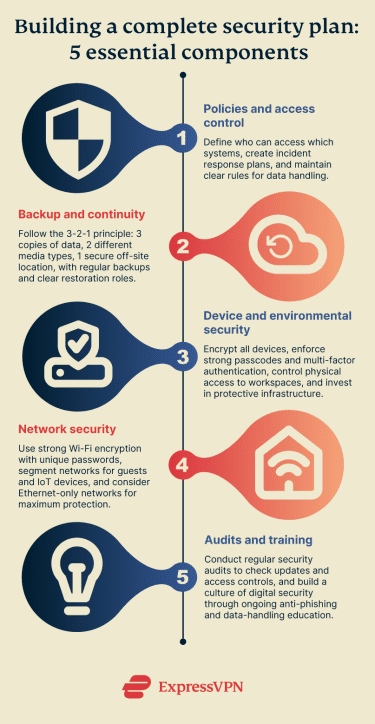
More specifically, there are 5 areas your organization should consider when building a comprehensive security plan:
Policies and access control
Good policies help keep access predictable, auditable, and easy to manage under pressure. Create a short incident plan that names decision‑makers, outlines how to contain issues, and explains how to restore files from verified backups. Write plain‑language acceptable use rules, such as what can be shared, how to handle data, and how to report suspicious activity.
It’s equally important to set strong, clear policies when working with external partners, supporters, or sources. Depending on the threat level, this may include encouraging or requiring encryption, MFA, breach notification practices, and defined retention and deletion policies.
Keeping secure records of contacts, documentation, and other evidence (like access reviews) can also help you maintain better visibility into your organization’s data integrity. Define who can access each core system, and how access is approved, reviewed, and revoked regularly. Limit privileges where possible, and keep a simple access inventory with change logs.
Backup and continuity
No matter how strong your setup is, data can still be lost or corrupted. This creates the risk of losing critical information such as contact details for members and supporters, strategic plans, documentation of activities, and important records.
Having a well-defined backup and recovery plan is important for reducing these risks. The 3-2-1 principle is a widely used approach: maintain at least 3 copies of a file or document, store them on at least 2 different types of media, and keep at least 1 copy in a secure off‑site location.
Combine this strategy with clear roles for who is responsible for data backup and restoration, and you’ll be in a stronger position than many organizations. Make sure backups are performed regularly so recent versions are available, and avoid retaining data longer than necessary.
Device and environmental security
Protecting devices and workspaces can help reduce compromise risks, limit the chances of loss due to theft, and keep operations running during outages. Start with a secure baseline on every laptop and phone, including full‑disk encryption, long and strong passcodes, MFA for critical accounts, auto‑updates, screen locks, and minimal admin rights.
Define clear bring-your-own-device (BYOD) and remote‑work policies so that only authorized, encrypted, up‑to‑date devices can access your network and sensitive data. Control office or headquarters entry, store high‑value equipment in lockable cabinets or safes, keep devices away from windows, and consider using cable locks and tamper-evident seals where appropriate.
It may also be helpful to invest in infrastructure that protects your devices. Surge protectors, uninterruptible power supplies (UPS), spare chargers, and drives can help prevent hardware damage and downtime, allowing for work to continue during critical situations.
Network security
Weak Wi-Fi security can create an entry point for unauthorized access to your local devices and network activity. Use strong encryption with a unique password, and consider changing default router settings, such as the Service Set Identifier (SSID).
Segmenting your network with a separate guest network (or virtual local area network, or VLAN) can help prevent different types of traffic from mixing and reduce exposure. It’s also advisable to isolate all Internet of Things (IoT) and other non-essential devices, as they may introduce additional vulnerabilities.
Regular anti-malware scans, firewall setup, audits, and tight access policies can all contribute to stronger network security. For personal devices used at work, applying similar standards alongside a clear BYOD policy can help clarify responsibilities.
If your setup allows, consider using an Ethernet-only (cabled) network. This way, physical access to the cable is required to intercept data, which is significantly more difficult for an attacker.
Audits and training
Modern digital threats evolve quickly, so it’s important to regularly review your security posture. Perform regular security audits to check updates, encryption status, user access, data integrity, and secure storage. If issues are identified, promptly improve processes and address vulnerabilities.
An audit can be as simple as establishing what type of data needs to be protected and what measures are currently in place, but it can expand to include testing weaknesses in your system. This can help you learn how to improve following past attacks and adapt to changing risks.
You can also introduce self‑paced modules and massive open online courses (MOOCs). These are flexible online courses that allow participants to learn at their own pace. They’re often free, and they’re useful for activists who need bite‑sized training that they can continue as risks evolve.
Here are some examples:
- Totem (Free Press Unlimited): Open‑source platform with 90-minute digital‑security courses in multiple languages, designed for safety.
- Advocacy Assembly: Dozens of free, 60- to 90-minute courses about digital rights and security, available in English, Arabic, Farsi, and Spanish.
- Coursera: A range of free digital safety and security courses that cover threat management, encryption, MFA, and layered defenses.
- Digital Safety and Security
- Cybersecurity for Everyone
- Cybersecurity and Privacy (Microsoft‑backed)
- Google’s IT Security: Defense against the digital dark arts
- Data, Security, and Privacy
Overall, fostering a culture of digital security can help keep you safe and aware of the latest threats. From simple anti-phishing training to more in-depth secure communication and data handling, education helps teams operate more safely. It can also reduce the likelihood that a single vulnerability leads to broader compromise across the whole organization.
Emergency response and reporting platforms
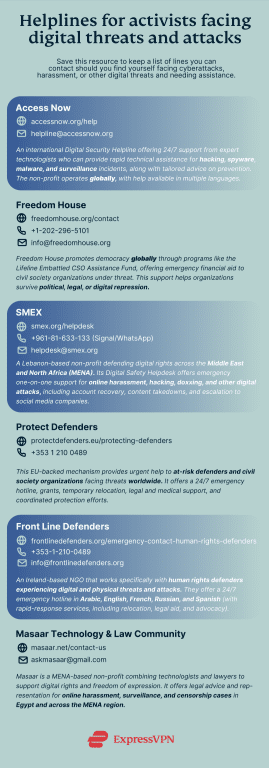
In 2024, Front Line Defenders reported 2,068 violations against human rights defenders worldwide. This highlights the need for effective emergency response and reporting platforms.
Trusted helplines can assist during incidents and help you to establish a response plan, whether that involves prioritizing next steps, handling evidence safely, or starting the recovery of accounts and services. They may also help connect you with legal or forensic support.
The bottom line
Digital security is constantly evolving, so it’s important to remain adaptable as an activist. Building layers of threat protection into your systems (secure communications, hardened devices, vigilant operations, and rapid‑response plans) is one of the most effective ways to stay safe and reduce the potential risks of surveillance, hacking, phishing, and takedowns.
Remember that your activist group can only be truly resilient when all of your members are aware of potential threats and know how to respond to them. Creating a culture of continuous learning and improvement can help you stay better prepared for evolving threats and tactics.