Google Search not working with ExpressVPN? Here’s how to fix it



Sometimes Google Search may not work as expected when connected to a VPN. For example, you might encounter repeated CAPTCHA checks or get results in the wrong language.
If you’re experiencing issues with Google Search while using ExpressVPN, here are a few easy fixes you can try.
Step-by-step fixes for issues with Google Search while using ExpressVPN
Switch to a different VPN server
If you’re seeing search results for the wrong country or in the wrong language, fixing the problem can be as easy as switching to a different server location.
Changing servers can also help if the one you’re connected to has temporary connection or routing issues that are causing Google Search not to load.
Choosing a nearby location will generally give you faster speeds, which can help if you’re having issues with searches timing out. Or, you can pick a server in the country with the results or language you’re looking for.
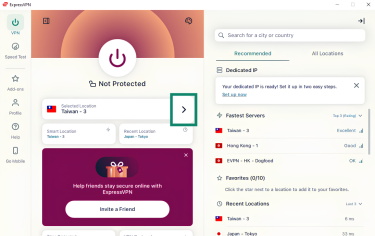
To change server in the ExpressVPN app, click the arrow next to Selected Location. This will bring up a list of available server locations. Then select a different location from the list.
Here’s how it looks in the Windows app:
Change the VPN protocol
A VPN protocol determines how your device connects to the VPN server. By default, ExpressVPN uses the Automatic protocol option, which lets the app choose what it thinks is best for your network. However, in some cases, manually selecting the protocol may yield better results.
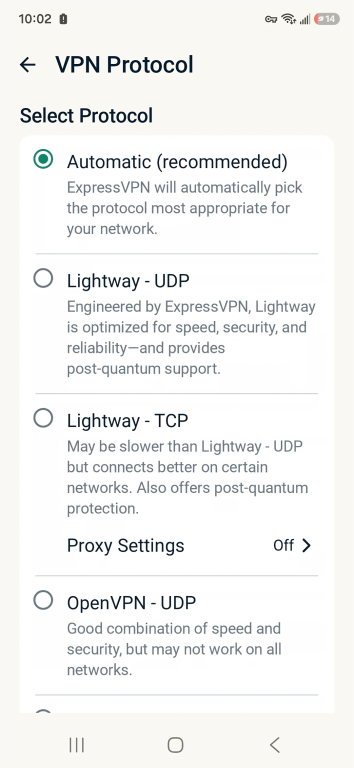
ExpressVPN’s apps support the following protocols: Lightway, WireGuard, OpenVPN, and IKEv2 (iOS only).
Here’s how to change the VPN protocol, using the Android app as an example:
- In the ExpressVPN app, tap on the Profile button.
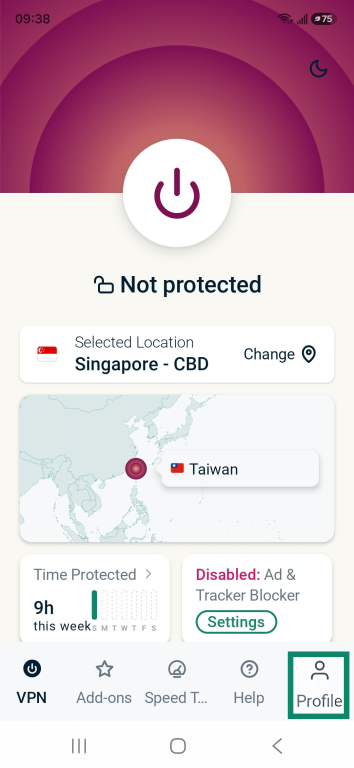
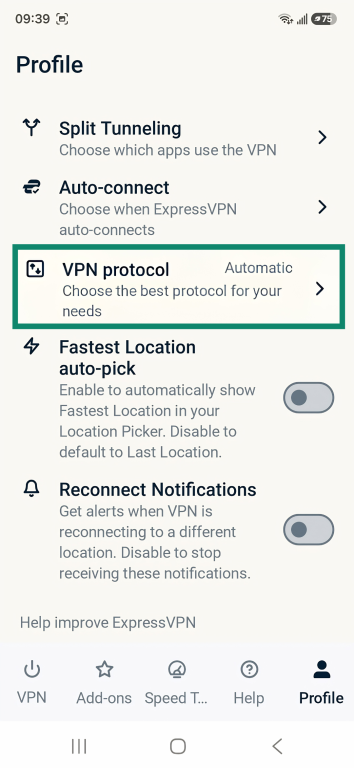
- Scroll down and tap VPN protocol.
- Select a different protocol.
Change your browser’s DNS settings
Some browsers have Domain Name System (DNS) security features, such as encrypted DNS requests. However, since ExpressVPN already provides encrypted, private DNS, these browser settings can sometimes interfere with the VPN connection and prevent Google Search from loading properly.
If Google Search seems to be working fine in other browsers, you may need to disable your browser’s DNS security settings. For detailed instructions on how to do this in Chrome, Firefox, and Safari, see our support guide: Google services not working with the VPN.
Why Google Search errors can happen when you use a VPN
There are three main reasons why Google Search errors sometimes occur when you use a VPN.
Location issues
When you search for something, Google can use your IP address to estimate your location and customize search results.
A VPN hides your device’s public IP address behind an IP address belonging to the VPN server. That’s why, when you’re connected to a VPN, Google may switch to a different language, load a regional version like google.fr or google.de, or show local results for a country you’re not in.
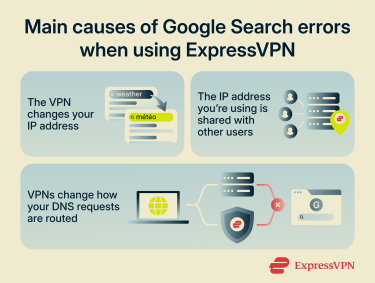
DNS clashes
DNS is the method the internet uses to translate domain names into IP addresses. It tells your browser where to connect when you type in a domain name.
A VPN changes how your DNS requests are routed. Normally, when you want to visit a website, your device sends a DNS request to a DNS server to learn the website’s IP address. These DNS servers are often run by your internet service provider (ISP).
When you connect to ExpressVPN, your device normally uses ExpressVPN's private DNS servers. However, some browsers have their own encrypted DNS settings, which may direct DNS queries to another provider. In some cases, these settings can interfere with Google services and prevent them from loading correctly.
Shared IPs
Google relies on automated systems to detect large-scale automated activity, such as bots and scraping. When these systems detect activity patterns that differ from what Google typically expects from a single user, they may require additional verification steps.
A VPN server’s IP address may be shared with several other users at the same time, so it can sometimes trigger repeated CAPTCHA checks.
FAQ
Will ExpressVPN change my search results?
Using ExpressVPN can change your search results. Google uses your IP address location to tailor language and local results. When you connect to an ExpressVPN server in another country or region, Google may show results associated with that location instead of your physical location.
Is it safe to use ExpressVPN with Google Search?
Yes, it’s safe to use ExpressVPN with Google Search. In fact, using a VPN can make your connection more secure and enhance your privacy when searching online. It encrypts your internet traffic, which makes it harder for your ISP or local network to see which domains you visit from the search results.
Why does Google Search block VPNs?
Google Search doesn’t generally block VPNs. Sometimes, its automated systems may challenge requests coming from a VPN IP address because the traffic might be flagged as unusual. Often this is the result of VPN IP addresses being shared by several users.
Generally, the situation is easily resolved by completing a CAPTCHA check.
What VPN settings affect Google Search?
The VPN server you connect to, the VPN protocol you choose, and your DNS settings can affect Google Search. The server location can affect the language and regional results Google shows. The VPN protocol can affect the stability and performance of your connection to Google. The DNS settings can change how your device finds Google’s servers, which can affect whether Google Search loads correctly.
Why does Google think I’m in another country when using ExpressVPN?
Google may think you’re in another country when you’re connected to ExpressVPN because it uses your IP address to help determine your location, and VPNs change your IP address. If you connect to an ExpressVPN server in France, Google Search may display results in French or show local results for France, even if you’re physically in the U.S.