Expressvpn Glossary
Wireless network security
What is wireless network security?
Wireless network security refers to the measures used to protect Wi-Fi networks from unauthorized access and data interception. It helps ensure that only approved users and devices can connect to the network and that data sent over it remains protected.
How does wireless network security work?
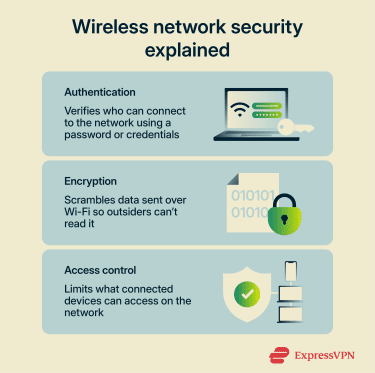 Most networks rely on a combination of encryption, authentication, and access control to secure connections.
Encryption protects the data sent over Wi-Fi by encoding it with cryptographic algorithms so outsiders can’t read it if they intercept the traffic. Authentication verifies that a user or device is allowed to connect. This often uses a shared Wi-Fi password (pre-shared key) in home networks or 802.1X authentication in business networks.
Access control determines which connected devices can do what on the network. For example, it can restrict access to certain systems, services, or parts of the network to reduce risk.
Common wireless network security protocols
Wireless network security protocols like Wi-Fi Protected Access (WPA) define how Wi-Fi networks protect connections. They determine how devices prove they’re allowed to connect and how the network protects data during transmission.
Some of the most common Wi-Fi security protocols used are:
- WPA3 (Personal): The latest Wi-Fi security standard. It strengthens encryption and uses Simultaneous Authentication of Equals (SAE), which helps protect against offline password-guessing attacks.
- WPA2 (Personal): A widely used standard that secures networks with a shared Wi-Fi password and Advanced Encryption Standard–Counter Mode with Cipher Block Chaining Message Authentication Code Protocol (AES-CCMP) encryption.
- WPA2/WPA3 (Enterprise): A standard used in business networks. It relies on 802.1X authentication with a RADIUS server, so each user signs in with individual credentials.
- Wired Equivalent Privacy (WEP): An early Wi-Fi security protocol that’s now considered insecure because it can be cracked relatively easily using widely available tools.
Some Wi-Fi networks run as open networks, which means they don’t use encryption or authentication. However, because the traffic isn’t protected, attackers may be able to intercept or monitor it more easily, as they can see the data traveling over the network.
Where is wireless network security used?
Wireless network security is typically used anywhere devices connect through Wi-Fi, including:
- Home Wi-Fi networks: Protect personal devices such as laptops, phones, and smart home equipment from unauthorized access.
- Public Wi-Fi hotspots: Used in places like cafés, airports, and hotels to help reduce risks such as data interception or fake hotspots.
- Corporate and enterprise networks: Secure employee access to internal systems and protect company data across office networks.
- Internet of Things (IoT) device networks: Help control and isolate connected devices such as cameras, smart TVs, and sensors, which often have weaker built-in security.
- Guest networks: Separate visitor devices from the main network to limit access to sensitive systems or data.
Risks and privacy concerns
Wireless networks can introduce security and privacy risks if they aren’t properly protected or configured. Because Wi-Fi signals transmit wirelessly, nearby attackers may attempt to intercept traffic or gain unauthorized access to the network.
Common risks and privacy concerns include:
- Evil twin hotspots: Attackers create fake Wi-Fi networks that appear legitimate to trick users into connecting. Once someone joins the network, attackers can monitor traffic or capture login credentials.
- Brute-force attacks: Attackers can capture Wi-Fi authentication handshakes and then try many passwords offline, which makes weak or common passwords vulnerable.
- Eavesdropping and packet sniffing: Attackers capture wireless traffic to observe unencrypted data or analyze metadata and traffic patterns, even when the content itself is encrypted.
- Misconfigured security settings: Weak encryption, outdated protocols, or default settings can expose the network to unauthorized access.
- Rogue access points: Unauthorized devices connected to a network can create hidden entry points that attackers may use to reach internal systems.
Further reading
- 12 smart ways to secure your home Wi-Fi network
- How to stay secure when using public Wi-Fi
- Network security key: What it is and how to find it
- How to set up a secure Wi-Fi guest network
- Evil twin attack: What it is and how to protect yourself