Expressvpn Glossary
Secure erase

What is a secure erase?
Secure erase is a process that permanently removes data from a storage device by overwriting or resetting the underlying storage so that erased data can’t be recovered with standard recovery tools.
Deleting a file or formatting a drive only removes the file references. The actual data often remains on the device. Secure erase is different because it targets the stored data itself, not just its references.
How does secure erase work?
Secure erase methods vary depending on the type of storage device.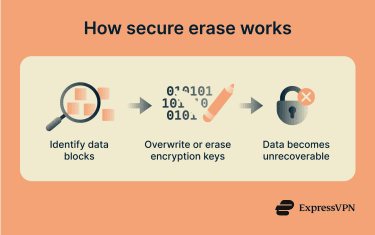
Hard disk drives (HDDs)
Data is stored magnetically across the disk sectors. Secure erase overwrites all sectors with new data, often with zeros or random data. The process permanently destroys data by replacing it and can be done several times to ensure the previously stored information can’t be recovered.
Solid-state drives (SSDs)
Data is stored in flash memory cells managed by the drive’s controller. Secure erase uses firmware-level commands to reset these cells across the whole device, including areas the operating system can’t directly access.
Many SSDs support standardized device commands, such as the Advanced Technology Attachment (ATA) Secure Erase command defined by the T13 Committee. Some devices use cryptographic erase, which deletes the internal encryption key, so the existing data becomes unreadable.
Why is secure erase important?
Secure erase reduces the risk of data being recovered after a device is reused, returned, resold, or disposed of. It protects personal, financial, and business information and supports compliance with data protection regulations.
Secure erase also aligns with recognized data sanitization standards, including those from the National Institute of Standards and Technology (NIST), particularly SP 800-88, and the Department of Defense (DoD) 5220.22-M standard. This guidance defines different methods for clearing, purging, or destroying storage media and explains when each method is appropriate.
In regulated environments, organizations may need to document and verify that they used approved sanitization methods.
Where is it used?
Secure erase is used when storage devices leave a controlled environment or are reassigned. Common scenarios include:
- Decommissioning servers, laptops, and desktop computers.
- Returning leased equipment.
- Selling or donating used devices.
- Reassigning drives within an organization.
- IT asset disposal and recycling systems.
It’s also used after security incidents when affected devices must be cleared before being reused.
Risks and privacy concerns of secure erase
The effectiveness of secure erase depends on the device and how it is implemented.
On some SSD devices, wear-leveling (designed to extend device lifespan by evenly distributing write/erase cycles across all memory blocks) can prevent some areas from being fully overwritten. Proper firmware-based erase commands are designed to address these areas, but reliability varies by manufacturer.
Tools labeled as “secure wipe” don’t always remove all underlying data. Verification usually involves confirming that the command completed successfully and that the device reports no accessible data.
Secure erase only applies to the device being wiped. Copies of data may still exist in backups, caches, synced systems, cloud storage, or hardware caches.
Secure erase is generally not suitable for highly sensitive data, severely damaged drives where erase commands might not reliably work, or where regulatory requirements demand high levels of assurance. In these cases, degaussing (demagnetizing HDDs) and shredding are often used.
Secure erase vs. other methods
| Method | How it works | Device reusable? | Notes |
| Formatting or deleting | Removes only the file references | Yes | Underlying data often recoverable |
| Software overwrite tools | Overwrites data via the operating system (OS) | Yes | Cannot reach areas inaccessible to the OS |
| Secure erase | Uses device-level commands to overwrite or reset storage | Yes | More thorough than OS-level tools |
| Cryptographic erase | Deletes encryption keys, rendering data unreadable | Yes | Effective only on encrypted devices |
| Physical destruction | Renders the device inoperable | No | Guarantees data is unreadable; required for some regulatory context |
Further reading
- How to wipe a computer: Securely erase all data (step-by-step guide)
- How to reset your MacBook or iMac: A complete step-by-step guide
- How to wipe your iPhone or Android before selling it
- How to properly dispose of your hard drives
- How to delete your hard drive browsing history