Expressvpn Glossary
Password protection
What is password protection?
Password protection is a security measure that controls access to files, devices, or accounts (for example, banking, social media, or email).
It requires users to enter a credential they know, such as a password, PIN, or passphrase. Passwords may include letters, numbers, and special characters. Passphrases are longer, memorable sequences of words. PINs are numeric codes, commonly used for device unlock or account access.
Modern systems increasingly use biometric authentication, including fingerprint recognition, facial recognition, and iris scanning. Biometrics can make sign-in faster and more convenient, but they are typically used alongside a device or other factor rather than as a universal replacement for passwords.
How does password protection work?
Here’s how password protection usually works:
- User creates a secret credential: During signup, the user sets a password. Some services still enforce complexity rules, but current best practice generally favors longer passwords and screening against common or compromised choices rather than requiring specific character combinations.
- Service stores a password hash: In a properly designed system, the service adds a unique salt (random data) to the password and stores a salted hash rather than the plaintext password.
- Login compares hashes: The system hashes the submitted password with the stored salt. If the result matches, the login succeeds.
Once login succeeds, the system typically issues a token or session ID. This temporary credential keeps the user authenticated without requiring them to re-enter their password on every action. These tokens should be protected and invalidated after logout or timeout.
Many systems also use rate limiting or login throttling to prevent brute-force attacks. When someone repeatedly enters incorrect credentials, the system may respond with throttling, CAPTCHA challenges, temporary lockouts, or exponential delays between attempts.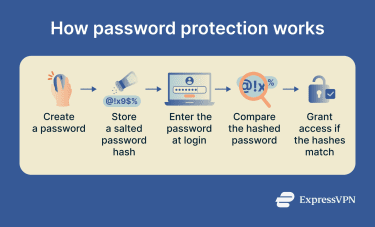
Why is password protection important?
The primary purpose of password protection is to block unauthorized access to accounts, devices, and files.
Weak or stolen passwords can lead to data breaches, identity theft, regulatory fines, reputational harm, and business disruptions.
Common tactics that exploit weak authentication or stolen credentials include brute-force attacks, credential stuffing, phishing, keylogging, dictionary attacks, and password spraying.
Strong, unique passwords are much harder to guess or crack. Current best practice generally emphasizes sufficient length and uniqueness over mandatory character-type rules, and adding multi-factor authentication (MFA) significantly reduces the chance of compromise, even if an attacker obtains the password.
Password protection can also help organizations support broader security and compliance obligations under frameworks such as the General Data Protection Regulation (GDPR) and Health Insurance Portability and Accountability Act (HIPAA), alongside other technical and organizational safeguards.
Where is password protection commonly used?
- Online accounts: Email, social media, banking, and cloud services.
- Devices: Phones, laptops, tablets, and smart home systems.
- Network access: Wi-Fi networks and router admin panels.
- Data protection: Encrypted files, password managers, and secure archives.
Privacy and security risks
The main causes of password vulnerability are:
- Weak passwords: Passwords based on common words, dates, or simple patterns are easier for attackers to guess and vulnerable to various password attacks.
- Password reuse: A single password reused across multiple accounts can expose all of them at once. Attackers use credential stuffing to test leaked or stolen credentials automatically across other platforms.
For organizations, breaches can result in financial losses, operational disruption, theft of sensitive data or intellectual property, regulatory exposure, and reputational damage.
Further reading
- The best way to store your passwords securely
- What is a password manager?
- Passphrase examples and how they work
- Diceware passwords: How to create secure passphrases
- How do hackers get passwords?