Expressvpn Glossary
Data access

What is data access?
Data access is the ability to retrieve data from storage systems such as databases, file systems, or cloud repositories. Depending on the permissions granted, this interaction can take different forms: reading data, writing or updating it, or deleting it entirely.
Policies and permissions govern who or what can interact with specific data, and access requests are evaluated against these controls before data is disclosed or modified.
Data access typically occurs through database queries, APIs, or system processes. In many enterprise environments, access events and security-relevant actions are logged to support monitoring, accountability, and auditing.
How does data access work?
Data access follows a structured process that verifies identity, evaluates permissions, and records activity.
- Request submission: A user, application, or system process submits a request to retrieve or modify data through a login session, an API call, or a database query.
- Authentication: The system verifies the requester's identity before processing the request.
- Authorization: Once the requester is authenticated, the system checks whether they have permission to perform the specific action, such as reading, updating, or deleting data.
- Secure data operations: The system carries out the requested action in accordance with defined permissions and security controls.
- Logging and auditing: Relevant access events and security-relevant activity may be logged to provide traceability, support monitoring, and enable investigation into misuse or anomalies.
This sequence helps keep the data interactions controlled, accountable, and consistent with defined security policies.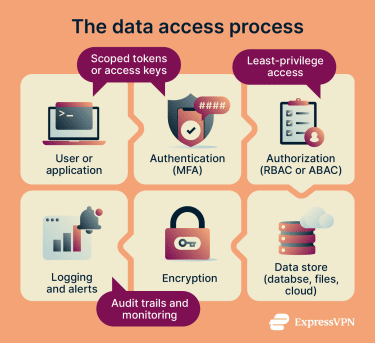
Types of data access
Different access control models and management approaches determine who can interact with data and under what conditions.
- Role-based access control (RBAC): Permissions are grouped into roles (for example, “billing” or “admin”), and users gain access by being assigned the appropriate role. RBAC is often used to standardize access by job function.
- Attribute-based access control (ABAC): Access is defined by attributes tied to the requester, the data, the requested action, and the context, such as location or time. This allows for more granular, policy-driven control than role assignment alone.
- Discretionary access control (DAC): Resource owners grant or restrict access to other users through file or object permissions, making access decisions on a per-resource basis rather than through system-wide rules.
- Mandatory access control (MAC): A central authority defines access rules based on data sensitivity labels and formal authorizations such as clearances. Users have no ability to override these controls.
- Privileged access management (PAM): PAM is not a separate access control model, but a set of controls and practices for managing accounts with elevated privileges. It applies stricter controls and monitoring to admin and service accounts to reduce the risk of misuse or compromise.
Why is data access important?
Effective data access controls prevent unauthorized exposure of sensitive information. Restricting who can retrieve, modify, or share data reduces the risk of accidental disclosure, insider misuse, and external compromise.
Limiting access also contains the impact of breaches. Following the principle of least privilege, granting only the minimum access needed for a task helps reduce unnecessary exposure. When access is limited to what is necessary, a compromised account is less likely to expose unrelated systems or large volumes of data.
Data access controls also support compliance efforts by helping organizations enforce accountability and protect sensitive information, including personal, financial, and health data.
Where is it used?
Organizations apply data access controls wherever information is stored, processed, or exchanged.
- Cloud storage and databases: Access policies regulate who can retrieve, modify, or manage centrally hosted data across cloud platforms and database systems.
- Corporate networks and file shares: Organizations control employee interaction with shared drives, internal systems, and network resources through defined access permissions.
- Software-as-a-Service (SaaS) applications and admin dashboards: Web-based business applications enforce role- or policy-based permissions to restrict access to sensitive settings, reports, or customer records.
- APIs and developer platforms: Application programming interfaces authenticate and authorize requests before granting external systems or third-party services access to underlying data.
- Mobile applications accessing user data: Mobile apps may request controlled access to device or cloud-based information, governed by account credentials, backend authorization, and platform-level permission settings.
Risks and privacy concerns
Weak or poorly managed data access controls can expose sensitive information and increase the likelihood of security incidents.
- Over-permissioned accounts and roles: Granting users or service accounts more access than necessary expands the attack surface, making it easier for compromised accounts to reach unrelated or sensitive data.
- Stolen credentials and session hijacking: Attackers who steal login credentials or compromise active sessions can impersonate legitimate users and gain unauthorized access. Without safeguards such as session protections, reauthentication for sensitive actions, or anomaly detection, these requests may appear legitimate to the system.
- Excessive API access and token leaks: APIs often rely on tokens to authorize requests. Tokens that are overly permissive, improperly scoped, or exposed can allow attackers to retrieve or manipulate data without needing a password. API risk can also arise from broken authorization checks that expose data or functions to the wrong users.
- Insider misuse and privilege creep: Users can accumulate access rights beyond their current responsibilities over time. This privilege creep increases the risk of both accidental misuse and intentional abuse of sensitive data.
- Poor logging and weak monitoring: Without reliable logging and oversight, unauthorized access or unusual behavior can go undetected, delaying incident response and increasing potential damage.
Further reading
- What's the difference between authentication and authorization?
- What is OAuth 2.0, and how does it work?
- What is just-in-time access, and can it improve cybersecurity?
- Attack surface reduction explained: Principles, techniques, and tools
- Data theft: What it is and how to protect yourself